Sensors – Bitdefender TechZone
2026-09-30
GravityZone Sensors across endpoints, network, identity, cloud, mobile, and productivity apps feed the Correlation Engine for XDR, combaining related events into unified incidents. Deploying sensors across all surfaces reduces blind spots - cloud attacks that never touch managed endpoints are caught only by cloud and identity sensors. Response actions depend on sensor type.
Bitdefender GravityZone collects detection telemetry through sensors placed across attack surfaces, including endpoints, networks, identity directories, cloud workloads, productivity applications, and mobile devices. The Correlation Engine analyzes signals from each surface to reconstruct attack chains. Deploying sensors across all available surfaces reduces blind spots.
Sensors are not limited to collecting telemetry. Depending on the sensor, the integration also adds response actions, such as isolating an endpoint, disabling a compromised directory account, or deleting a phishing email from affected mailboxes.
Sensor Coverage
Sensors are grouped by attack surface. Each sensor links to its dedicated article, which covers detection, deployment and configuration, along with hands-on scenarios and common mistakes and misconceptions.
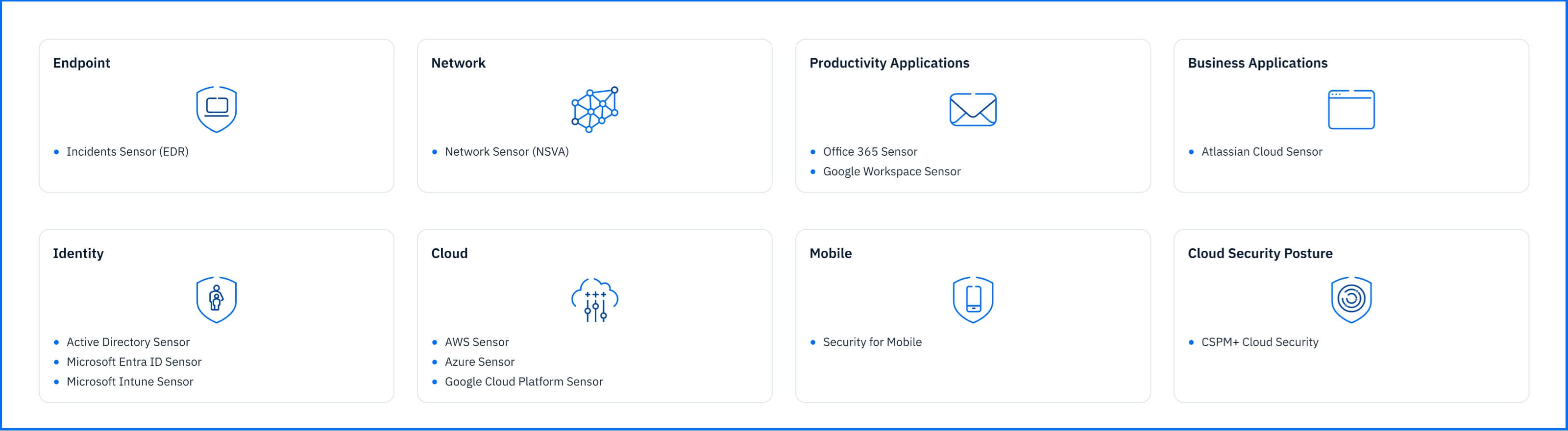 Fig. 1. GravityZone sensors grouped by the attack surface they cover |
Endpoint Sensors: Collect operating system events from the endpoints including process creation, file manipulation, registry changes, and network connections, together with detections from BEST components such as Network Attack Defense and Fileless Protection.
Network Sensors: Analyze a copy of network traffic received through a SPAN port, from each device on the network including unmanaged ones, and detect port scanning, brute-force logins, exploits used for lateral movement, and command-and-control channels.
Productivity Applications Sensors: Connect directly to Microsoft 365 and Google Workspace, with no appliance or agent, and process account, administrative, email, and file activity from Exchange Online, SharePoint, OneDrive, Gmail, and Drive, detecting phishing emails, malicious file uploads, suspicious sign-ins, and mail forwarding used for exfiltration.
Business Applications Sensors: Retrieve audit events from Atlassian Admin, Jira Cloud, and Confluence Cloud through a direct connection, detecting credential attacks, API token creation, permission changes in Jira, and public exposure of Confluence pages.
Identity Sensors: Collect authentication and directory activity: Kerberos, NTLM, and LDAP events from domain controllers, sign-ins and configuration changes from Microsoft Entra ID, and device, policy, and app changes from Microsoft Intune.
Cloud Sensors: Read each platform's own audit stream with no appliance or agent, detecting reconnaissance, compromised keys, privilege changes, data exports, and audit log deletion.
Mobile Sensors: Process the device events that GravityZone Security for Mobile collects on Android and iOS devices, detecting malicious apps, rooted or tampered devices, network scans and man-in-the-middle conditions.
Cloud Security Posture: When an incident involves cloud resources, CSPM+ queries GravityZone Cloud Security and adds the matching misconfiguration findings to the incident's Associated Risks widget.
Correlation Engine
Individual sensor events are like single puzzle pieces: a failed login or a script running on a computer is easy to miss among thousands of routine events. The Correlation Engine links related events and puts them in order, so what looked like unrelated events becomes one clear timeline of the attack.
The Correlation Engine for EDR connects events from endpoints only (see the Incidents Sensor article). The Correlation Engine for XDR connects events from every sensor, so it can follow an attack from the first compromised account or device to each system the attacker reached.
 Fig. 2. Sensors send raw events from each attack surface to the Correlation Engine for XDR, which assembles related events into one incident |
Anomaly Detection gives each machine its own machine learning model, so it knows what is normal for that specific computer. Unusual behavior is checked against known attack techniques from MITRE, custom rules from Bitdefender Labs, and the user's own activity. For example, if PowerShell, a trusted Windows tool often abused in living-off-the-land attacks, normally runs once a month but suddenly runs several times in one day, the model flags it as unusual and sends it to the Correlation Engine.
Correlated Incidents in Incident Advisor
Incident Advisor shows the whole attack in one place, with events from every sensor involved, and recommends the steps to stop it and clean up. You can see every machine and account the attacker reached, so the response covers all of them.
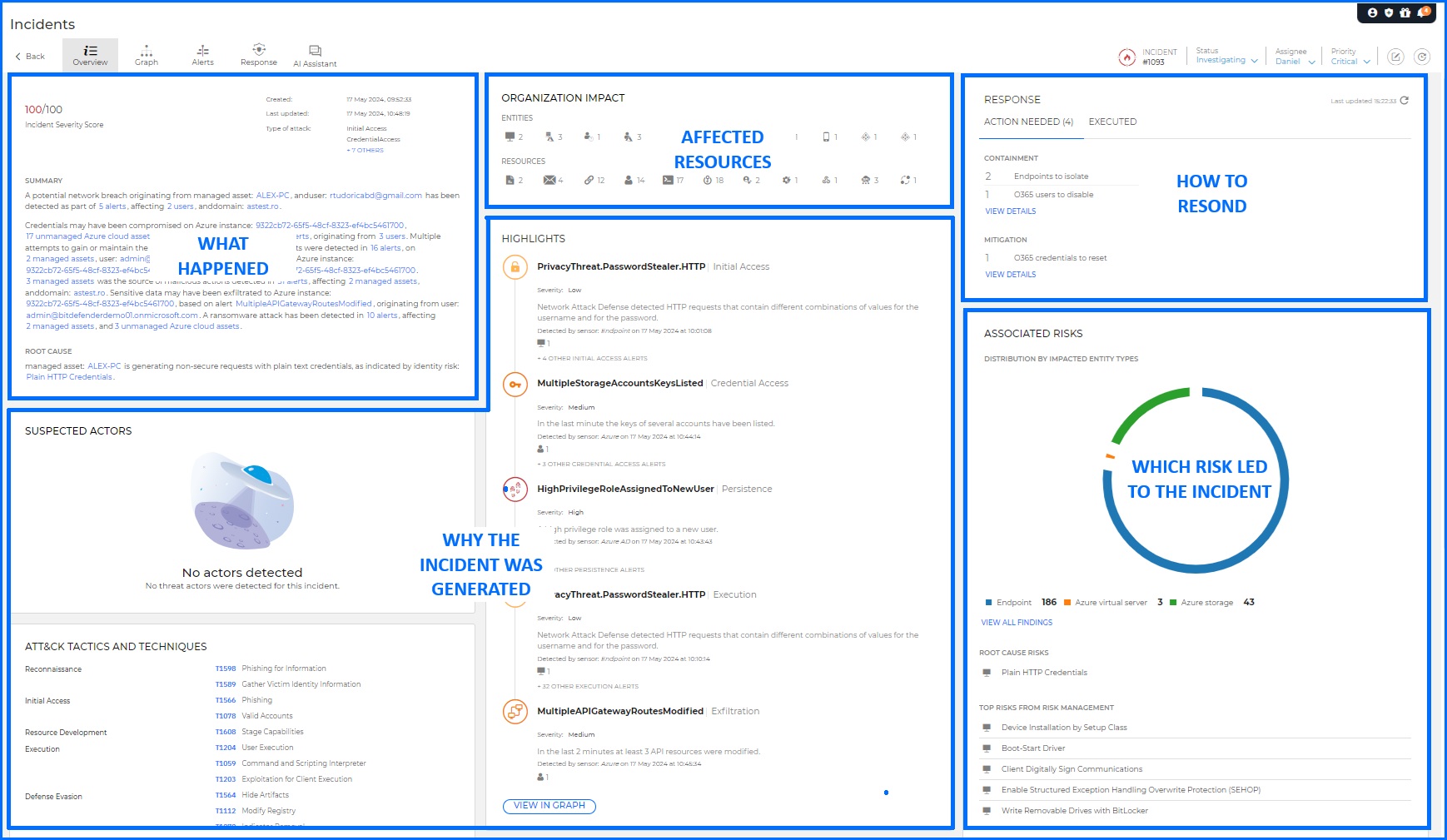 Fig. 3. Bitdefender GravityZone Incident Advisor allows security teams to check all the key details about the particular incident. |
Hands-on Scenarios
Imagine an attack that begins with a single email. An employee opens a phishing message and runs the attached file. The attacker's code opens a command and control (C2) connection from inside the network back to the attacker's server. Next, the attacker tries to guess passwords on a file server and starts logging in to other machines with administrator rights to steal data and deploy ransomware.
 Fig. 4. XDR Demo incident graph. |
Each attacker step leaves a trace in a different place, and the sensor watching that place records it. To see this attack with all its detections, open the Demo Incident (available with XDR subscriptions) in your GravityZone console: go to Incidents > All Incidents and click the demo icon in the top-right corner. The GravityZone Demo Incident article walks you through each step of the recorded incident.
Common Mistakes and Misconceptions
“More sensors mean more alerts to go through”
The Correlation Engine groups related events from different sensors into one incident instead of reporting each one separately. In the Demo Incident, detections from email, network, identity, and endpoint sensors end up in a single incident.
“Cloud attacks eventually show up on the endpoint”
Many do not. Deleting audit logs, changing permissions, or misusing access keys happens inside the cloud platform and never touches a managed computer. Only the platform's own activity log records it, so an environment covered by the Incidents Sensor alone would miss these attacks entirely. The AWS, Azure, and Google Cloud Platform sensors close that gap by reading that log directly.
"Sensors block attacks when they happen"
Sensors watch and report; they do not stand in the path of a login or an API call. Blocking comes from prevention layers and the response actions your team takes in the GravityZone console once the Correlation Engine has built the incident.
“Every sensor can take response actions”
Response actions depend on the sensor. Some add actions on their own surface, such as isolating an endpoint or disabling a compromised account; others, such as Security for Mobile, only contribute detections. The Threat Response article lists the actions available.
Recommended Content
To learn more about the technologies included in the Detection layer we recommend reading the next article Incidents Sensor.
More Resources
Bitdefender GravityZone XDR official website: GravityZone XDR
Discover the XDR Sensors full potential with our dedicated video masterclasses: Masterclass