Prevention First: From Vulnerability Management to Exposure Management – Bitdefender TechZone
2026-11-02
Only 26% of CISA KEV vulnerabilities were fully fixed in 2025, with median fixes taking 43 days. GravityZone Exposure Management ranks the routes attackers would use and removes them first, so a lean team fixes first what breaks the most routes.
Exploitation of vulnerabilities is now the most common way attackers get in: 31% of breaches with a known initial access vector, according to the 2026 Verizon Data Breach Investigations Report (DBIR). Defenders are falling behind. Only 26% of the critical vulnerabilities in the CISA Known Exploited Vulnerabilities (KEV) catalog were fully remediated in 2025, and the median fix took 43 days, up from 32. Vulnerability management has not failed, but patching everything faster is no longer possible. The question is now which weaknesses an attacker would actually use, and how to remove them first. That is exposure management, and answering it continuously is what prevention-first security looks like.
What Vulnerability Management Does Not See
Consider a company that moved its mail to Exchange Online but still runs one Exchange 2019 server on-premises to manage hybrid recipients, with Outlook on the web published to the internet. In the vulnerability queue, the server’s exploitable flaw is one item among hundreds, on a machine already scheduled for retirement. Help desk administrators sign in to that server to manage recipients, which leaves their credentials in its memory. Last week, one of those administrators also signed in to a user’s workstation to fix a problem. None of these facts is worth escalating on its own. Together they give an attacker two ways in, one from the internet and one from a phishing email, and both lead to the same privileged account and from there to the servers that run the domain.
The scenario shows the four places where the weaknesses behind real intrusions sit, and where a CVE scanner looks least:
The external surface nobody inventoried. A forgotten subdomain, a test server with a public IP address, an expired certificate, or a server kept online through a migration.
Misconfigurations. A local administrator account nobody remembers creating, a disabled security setting, or a weak protocol configuration. None of these has a CVE number, and all of them weaken a machine.
Identities. Reused passwords, exposed credentials, and privileged accounts used for everyday work.
Legitimate tools. Bitdefender Labs analyzed more than 700,000 cyber incidents and found that 84% of major attacks use Living off the Land (LOTL) techniques: PowerShell, WMI, remote administration utilities, and other tools already present on the system. There is nothing to patch. The tool works as designed, and the attacker uses it for something else.
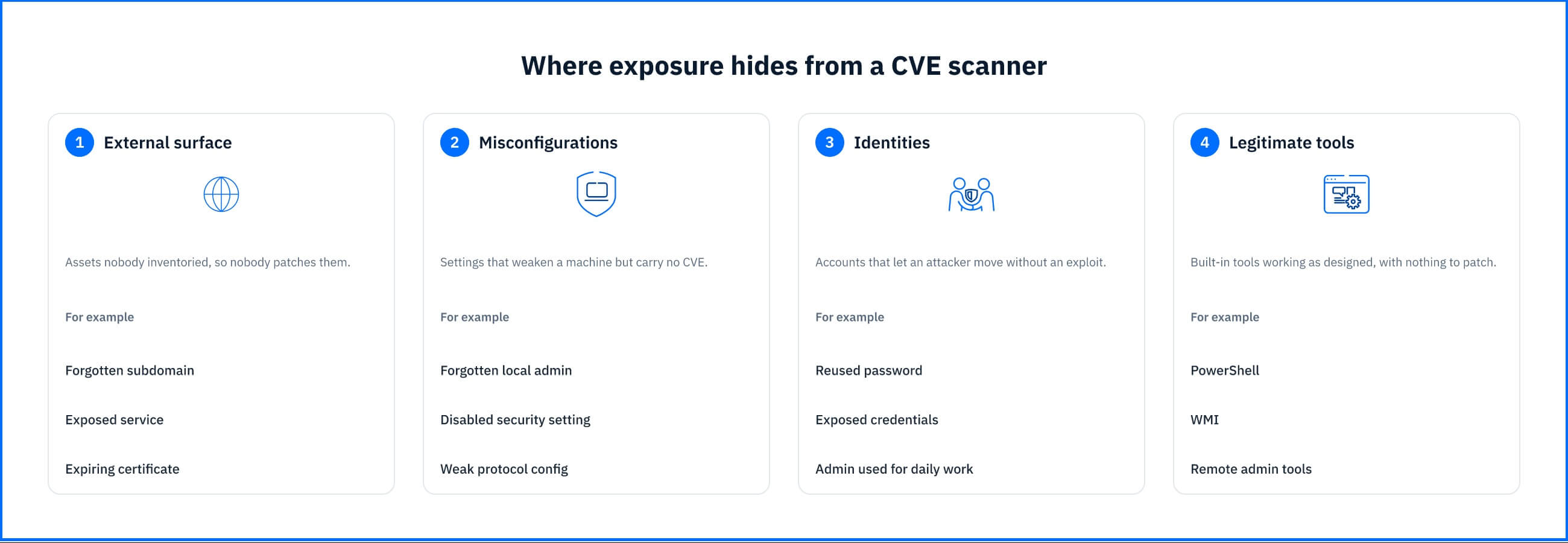 Fig. 1. Where exposure hides from a CVE scanner: the external surface, misconfigurations, identities, and legitimate tools. |
The usual objection is “we already scan for vulnerabilities, so we already do this.” Scanning produces findings; exposure management produces routes.
Exposure Management: Broader Scope, Sharper Priorities
Exposure management is the practice of continuously finding, prioritizing, and reducing the entry points and weaknesses an attacker could use. It is the next step from vulnerability management, not its replacement. Patching stays central; what changes is the scope of what gets examined and the logic of what gets fixed first.
Vulnerability management | Exposure management | |
|---|---|---|
Scope | OS and application vulnerabilities (CVEs) on known assets | Any exploitable weakness: CVEs, misconfigurations, identities, internet-facing assets, risky tool access |
Asset coverage | The managed inventory | The managed inventory plus what an attacker can discover from outside |
Prioritization | Severity of each finding in isolation | Reachability and exploitability: which weaknesses combine into a route to a valuable asset |
Remediation | Patch | Patch, reconfigure, constrain what a tool may do, or remove the asset from exposure |
Measure of progress | Findings closed | Routes closed and attack surface removed |
The word that matters most in that definition is “continuously.” Every fix changes the routes, and every changed route changes the ranking, so an assessment run once a quarter ranks an environment that no longer exists by the time the work is scheduled.
Faster Attacks, Leaner Teams
An entry point that no longer exists produces no alert, no incident, and no investigation. That is the case for putting prevention first, and attackers are making it stronger. Bitdefender’s March 2025 Threat Debrief found that automated scanners start searching the internet for vulnerable systems less than 24 hours after a vulnerability is publicly disclosed. Once inside, attackers can move fast. In the Akira ransomware attacks Bitdefender analyzed in an August 2025 technical advisory, they reached domain controllers within hours of initial compromise. The attack chain and techniques attackers look for are known, so they can be closed in advance.
What holds teams back is capacity, not intent. In the Bitdefender 2026 Cybersecurity Assessment, 57.0% of 1,200 IT and security professionals agreed they need to reduce their attack surface by disabling unnecessary or risky tools, but worry about disrupting the business. The barriers they named are practical: the overhead of maintaining hardening rules and exceptions (38.0%), limited resources (34.6%), and visibility gaps (33.8%). And 40% said their EDR or XDR platform already takes significant manual effort or cannot be fully implemented.
A new prevention program that can actually be run by a lean team requires a single view of exposure, prioritization, and hardening that maintains itself without adding another silo to the already existing stack.
How GravityZone Exposure Management Works
GravityZone Exposure Management brings five capabilities into one console and one continuous loop of visibility, prioritization, and reduction.
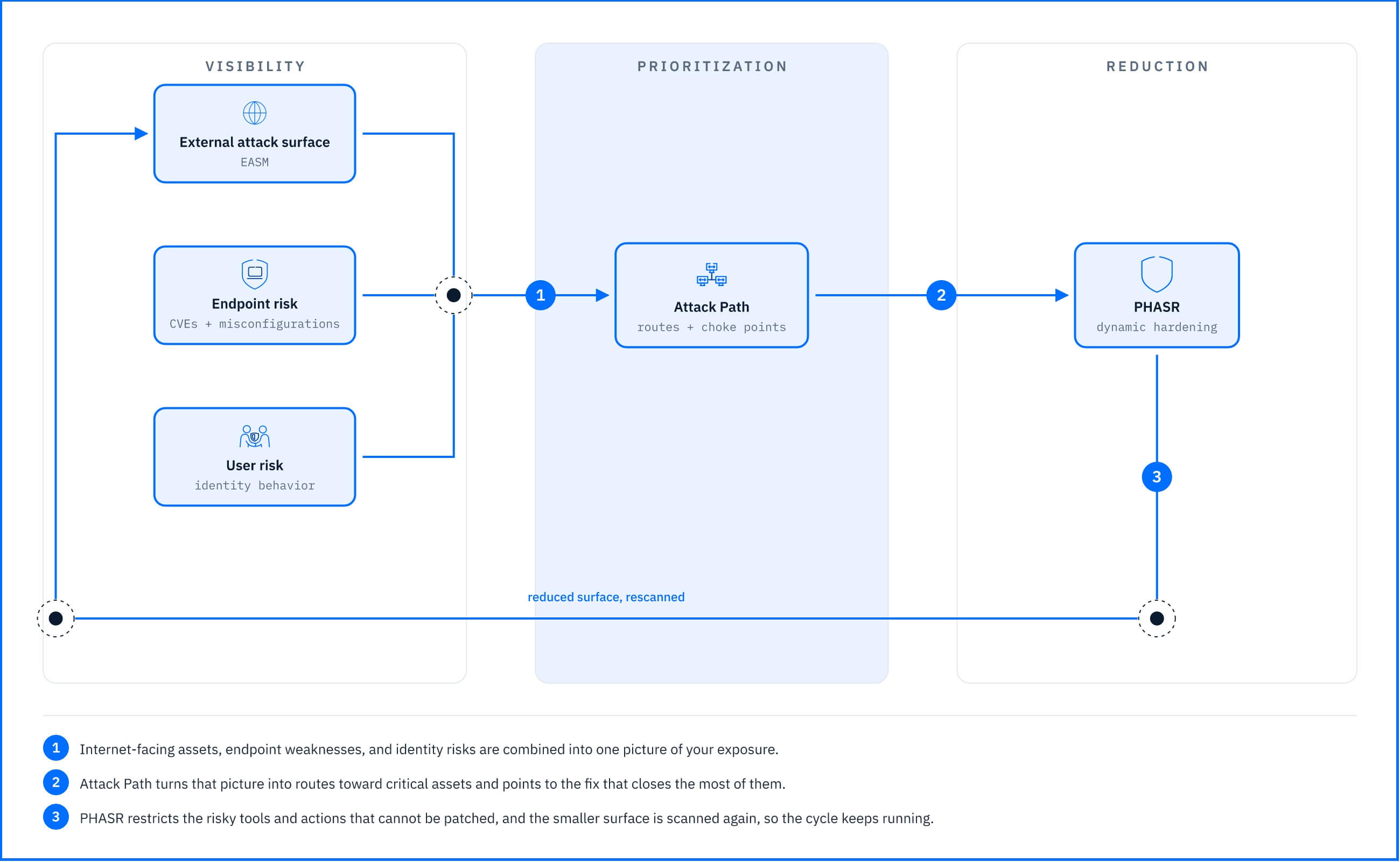 Fig. 2. Exposure management as a continuous loop: visibility, prioritization by attack path analysis, and automated reduction. |
See everything an attacker could use, in one place
Most teams hold exposure data in several places: an external scan report, a vulnerability list, an identity review, and a spreadsheet that tries to join them. GravityZone puts the outside and the inside in the same view.
Outside-in. External Attack Surface Management (EASM) is agentless and runs from Bitdefender infrastructure. Starting from your domains, email addresses, and IP ranges, it shows what an attacker can find: exposed services, open ports, vulnerable public services, and expiring certificates.
Inside-out. Endpoint Risk Management finds misconfigurations and vulnerable applications on managed endpoints, highlighting vulnerabilities already exploited in your industry. User Risk Management adds risky identity behaviors, such as password reuse and credential exposure.
Fix first what breaks the most routes
A longer list does not help a team that cannot clear the one it has. Attack Path Analysis turns the combined findings into the routes an attacker could take to a critical asset, and shows which single step several routes depend on.
In the hybrid Exchange example, the exposed server and a phished workstation both lead to the same help desk administrator account. Moving administrators to dedicated administrative accounts, used only from administrative hosts, closes every route below that account at once, which no patch on the downstream servers achieves.
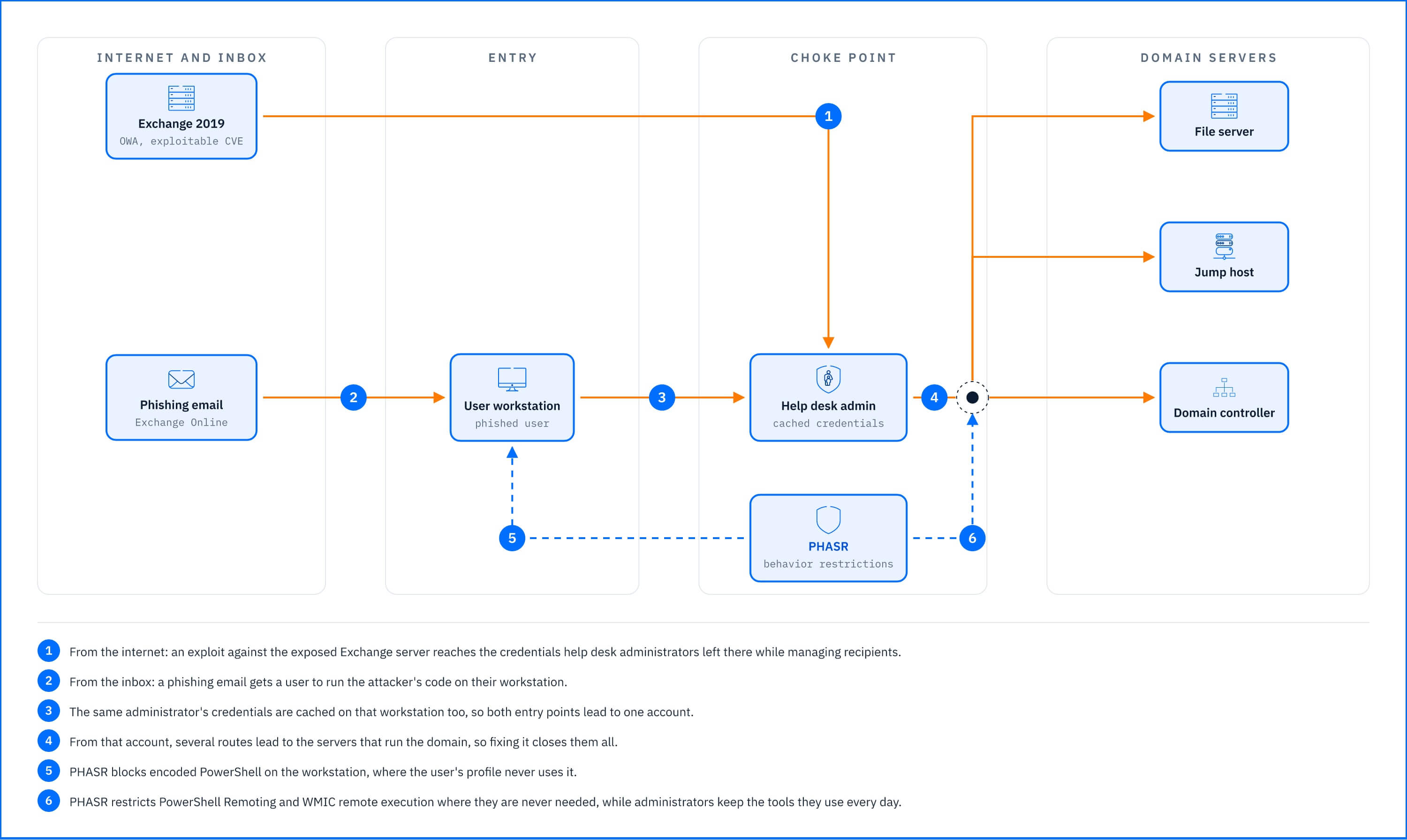 Fig. 3. Two entry points, one choke point: the hybrid Exchange example as an attack path. |
Constrain what cannot be patched
Some exposure has no fix: administrative tools the business needs, scripting interpreters, and operating system behavior working as designed. Proactive Hardening and Attack Surface Reduction (PHASR) removes the opportunity instead of the tool. It learns how each user works on each machine and restricts only the actions that profile never uses, so PowerShell stays available for daily work while the obfuscated scripts and remote execution an attacker relies on are blocked. In Autopilot mode, PHASR applies and maintains those restrictions. That answers the barrier survey respondents named most often: the overhead of maintaining hardening rules and exceptions. The same approach covers AI agents on Windows endpoints, which get their own profiles instead of everything their user is allowed to do.
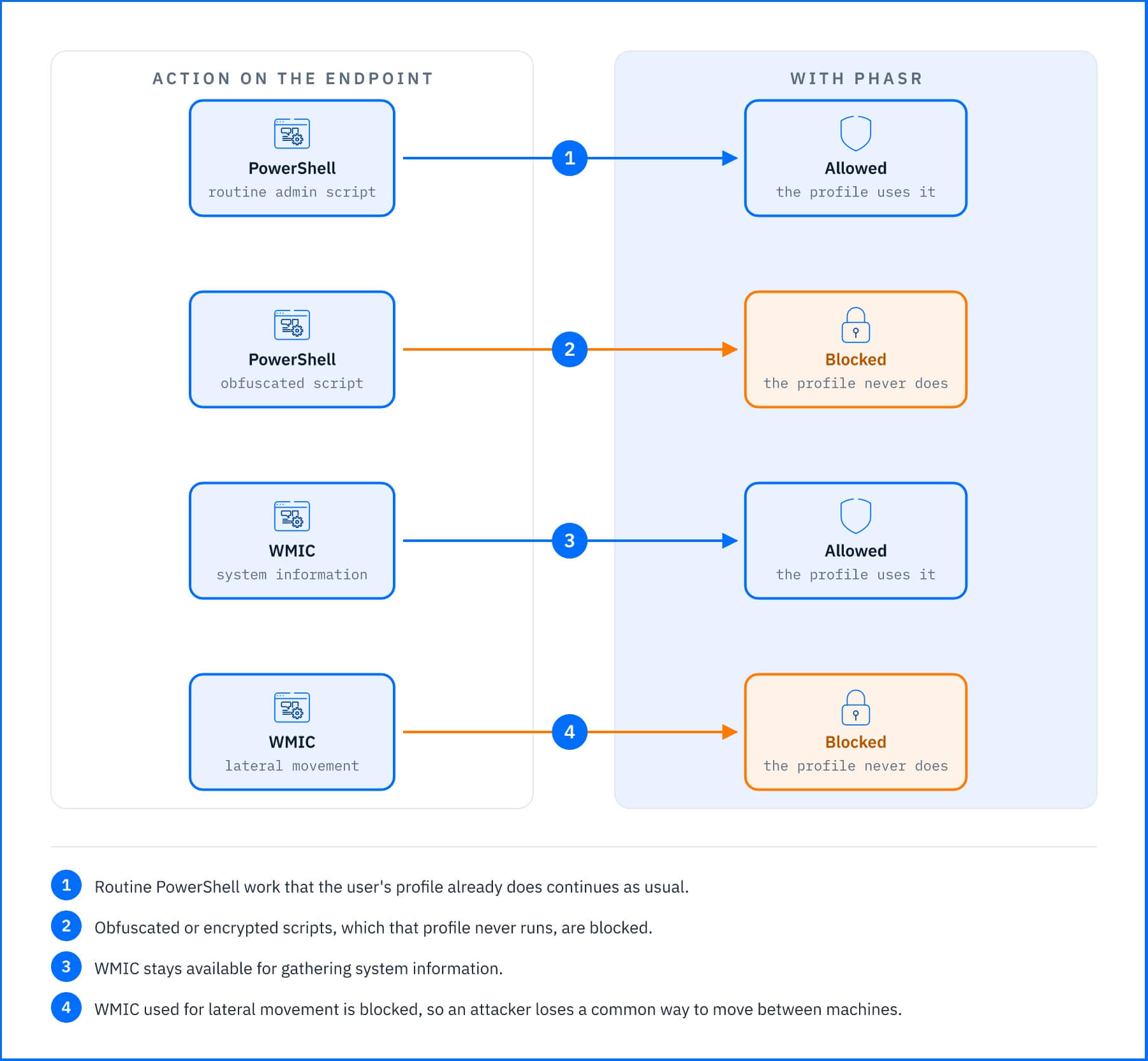 Fig. 4. PHASR restricts actions, not whole tools: the same tool stays available for daily work and is blocked for what only an attacker needs. |
Show progress in risk
Leadership asks whether the organization is safer, not how many findings were closed. GravityZone tracks attack paths over time, new against resolved, so a team can show the routes to its most important assets going down, and see as soon as a new entry point appears.
Getting Started Without Adding Complexity
A lean team does not need to do everything at once. Start with the conditions that most often turn ordinary findings into routes:
Look out for: internet-facing services nobody owns. What to do: point EASM at your domains and public IP ranges in the first week, and restrict or retire whatever has no owner.
Look out for: vulnerabilities already exploited in your industry. What to do: run risk scans and fix those first, ahead of higher-scoring findings nobody is exploiting.
Look out for: administrators signing in to ordinary workstations and servers with privileged accounts. What to do: give administrators dedicated accounts used only from administrative hosts, starting with the accounts that appear on the most routes.
Look out for: built-in tools in use where nobody needs them. What to do: let PHASR learn for its first month while you approve its recommendations, then hand stable activity types to Autopilot.
Look out for: findings set aside without a reason. What to do: when reachability decides what matters, deprioritizing a finding is legitimate. Give each one an owner, a compensating control, and a review date.
Where Exposure Management Ends
Exposure management reduces the number of ways in. It does not detect an attack already in progress, and no prevention program closes every route. An attack path describes what could happen, built from scan and inventory data, not what is happening.
That is why exposure management sits alongside detection and response, not in place of it. EDR and XDR watch what actually happens on endpoints, identities, networks, and cloud workloads, and Managed Detection and Response (MDR) adds round-the-clock analysts for organizations without their own SOC. The two sides also inform each other: an investigation in GravityZone shows the risks behind an incident, so it ends with the exposure to remove, not only the threat to contain.
Conclusion
Vulnerability management answers “what is unpatched?”. Exposure management answers “what would an attacker use, and what should we remove first?”. For a lean team, the second question is the one that fits the time and people available. GravityZone Exposure Management keeps the work in proportion to that team: one console instead of separate tools for external, endpoint, and identity risk; a ranked set of routes and shared steps instead of an ever-growing queue of findings; hardening that PHASR applies and maintains in Autopilot instead of rules someone has to write and update by hand; and one progress measure, open attack paths over time, that answers leadership without a separate report. Because it works with the GravityZone platform or alongside the endpoint protection you already run, a small team can put prevention first without rebuilding its stack.