AI Visibility and Control (AIVC) – Bitdefender TechZone
2026-09-23
AIVC inventories 50+ AI agents and 70,000+ skills via IDE extensions, local runtimes, and MCP servers connecting to internal systems, then prioritizes findings to surface configuration risks and agents extending beyond approved scope through unvetted skill extensions.
Bitdefender GravityZone AI Visibility and Control (AIVC) is a discovery and risk layer that runs on protected Windows endpoints and reports what AI software is actually installed and running there. Its job is to bring AI usage into the same risk picture as the rest of the attack surface: which AI tools are present, who is running them, how severe of a risk each one poses, and how to reduce the AI attack surface they create.
Why an AI inventory comes before an AI policy
AI software arrives on managed endpoints through paths that traditional software inventory does not watch. A user opens a browser tab and starts pasting into a chat assistant, and nothing is installed at all. A developer adds a coding assistant as an extension inside their editor, and nothing shows up in the list of installed programs. Someone downloads a local model runtime, a program that runs an AI model directly on the machine instead of sending data to a service, because they were told not to send company data to an outside service.
That creates a practical problem for the administrator who has been asked to “get AI under control”. Blocking a list of well-known AI websites is an enforcement action taken without knowing what is actually running. AIVC is a visibility and decision-support layer for risk reduction, where inventory turns a policy decision into an informed actions rather than a guess.
How AIVC finds and categorizes AI
During the risk scan, the GravityZone agent collects metadata from each endpoint and keeps that collection minimized: it records what AI software is present and how it is configured, not what anyone does with it. AIVC does not inspect prompts, chat history, model weights, credentials, or full file content. For complete AIVC requirements, see the Bitdefender support documentation.
AIVC recognizes more than 50 AI agents and more than 70,000 skills, the modular code packages that extend an agent's capabilities and that arrive from public registries rather than through any software-approval process. A skill is where an agent's permissions actually get used, so counting agents without counting skills would describe the smaller half of the exposure.
Every discovered service is assigned to one of 17 function categories, based on what the tool does rather than how it is deployed. The category appears in the AI Services view and is one of the primary filters an administrator can use to narrow a large estate down to the tools that matter for a given team or policy question.
LLMs and chatbots — general-purpose conversational AI and companions.
Coding — IDE, CLI, and repo-integrated coding assistants and code review.
Agents — autonomous agent products that act with minimal human input.
Tools and skills — agent frameworks, SDKs, skill libraries, tool-call infrastructure, and prompt-to-app builders.
MCP — Model Context Protocol registries and infrastructure.
Platforms and infrastructure — the hosted and self-hosted services a model is called through: model APIs, ML platforms, and security AI.
Writing and productivity — writing, translation, notes, meetings, and productivity tools.
Marketing — marketing, SEO, ad, and sales-content AI.
Automation — no-code automation, workflow, and RPA.
Voice and audio — speech synthesis, music, transcription, and voice interfaces.
Image and video — image and video generation, editing, design, and avatars.
Assistants — task and domain-specific AI helpers and answer engines.
Education — academic research, tutoring, and study AI.
Site generators — AI website builders that produce a deployable site.
Local models — models and the runtimes that execute them on the endpoint itself, rather than calling a service.
RAG / AI-DB — retrieval systems and the vector stores that hold indexed content for a model to query.
Data and analytics — AI-driven data preparation, querying, and business intelligence.
The category breakdown is what makes the inventory actionable at the policy level. A security team investigating data-handling risk filters to LLMs / Chatbots and Platforms & Infrastructure. A development manager auditing what tools touch source code goes straight to Coding and Tools / Skills. A governance review covering automation risk works from Agents, Automation, and MCP.
AIVC in Bitdefender GravityZone Console
AIVC appears in GravityZone Control Center as two views, each answering a different question an administrator brings to it.
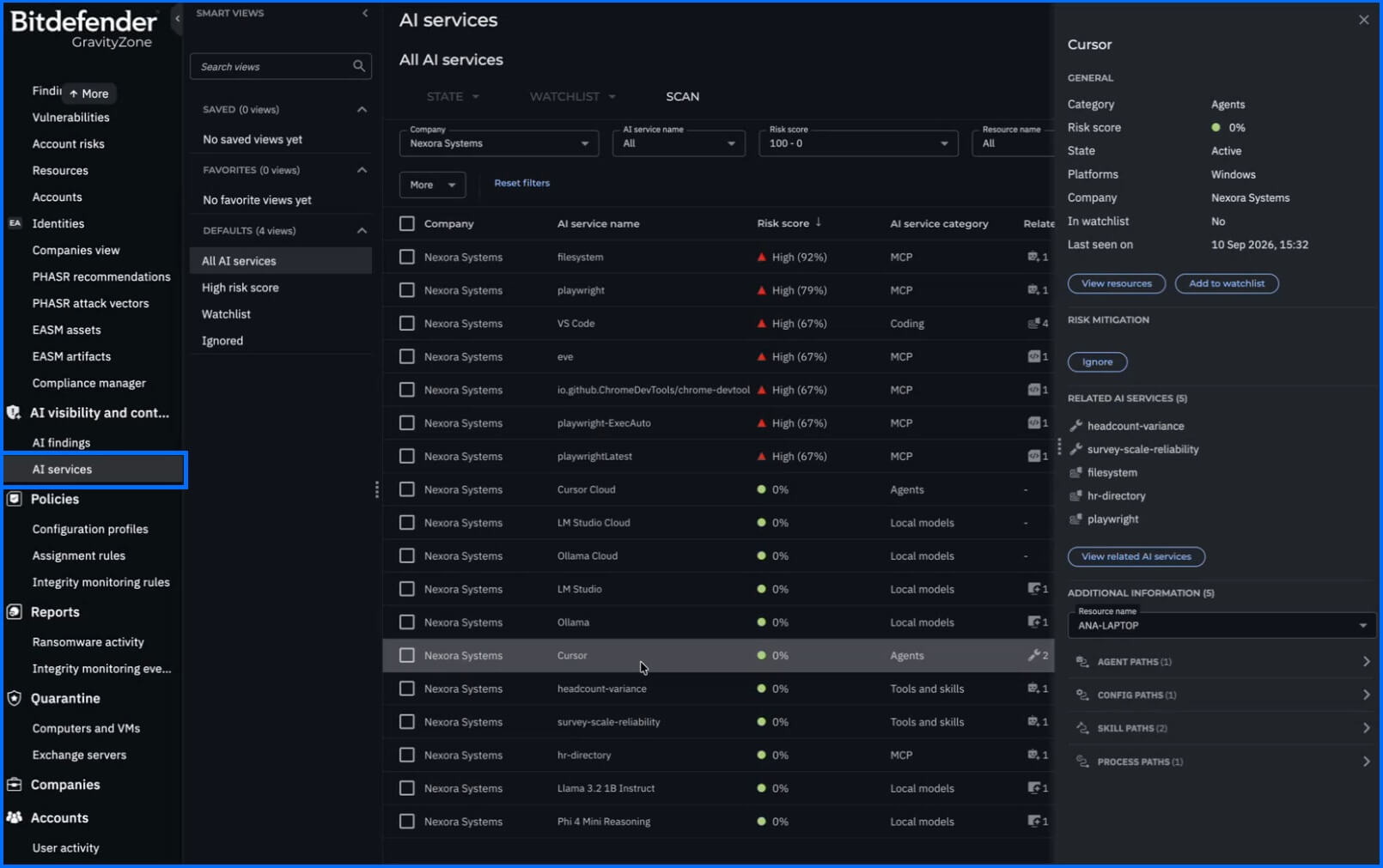
AI Services answers “what AI is running in my environment?” It is the inventory: every discovered service with its risk score, its function category, the related AI assets it depends on or exposes, the number of open findings, the affected resources it was found on, the endpoints it runs on , its state (Active or Ignored), and whether it sits on the watchlist. Filters and predefined views narrow it. Opening a service shows its details along with mitigation guidance for the risks associated with it.
 |
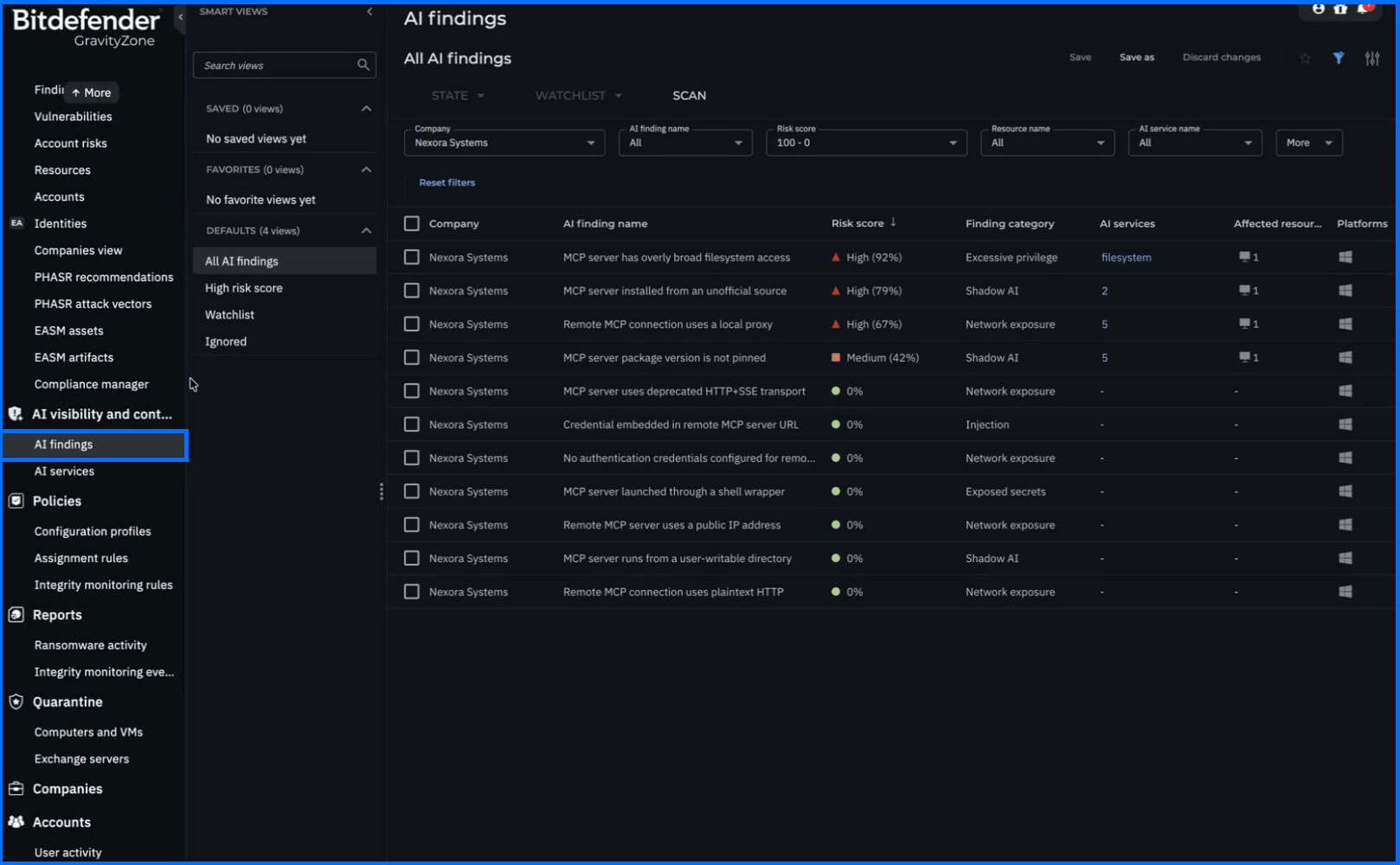
AI Findings answers “what should I look at first?” It is the prioritized risk view: each finding carries a risk score, the AI service it relates to, and the affected resources it was observed on. Each finding links to mitigation guidance and to the endpoint-specific evidence behind it, so an administrator can see why a finding was raised on one machine and not another before deciding what to do about it.
 |
Most administrators will work in AI Findings day to day and drop into AI Services when they need the full picture of a particular tool. Review AI Services against your list of sanctioned tools, not just AI Findings. A tool can have no findings and still not be one your organization approved.
For SOC analysts: AI Findings carry endpoint-specific evidence, which makes them usable as an investigation starting point rather than only as a posture metric. A finding tied to a local model runtime or an MCP server identifies a process executing on a specific host outside the browser sandbox, and the affected-resources list gives the host set to pivot from in Search (the telemetry query view) and Incident Advisor.
What AIVC discovers
AI reaches your endpoints through paths your software inventory was never built to watch. The inventory covers four classes of exposure, each of which sits outside a control you already own.
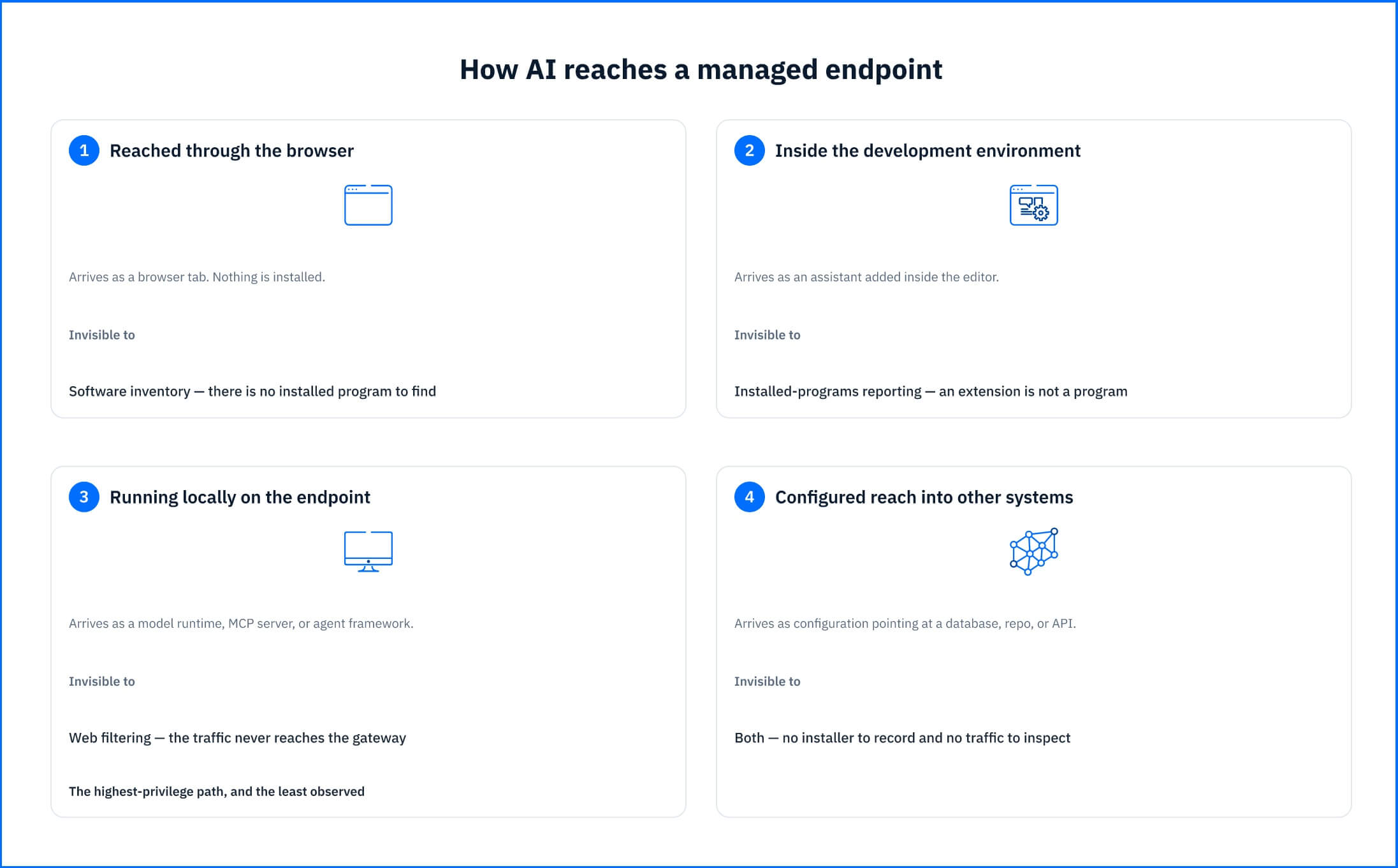 Fig. 1. Four paths AI takes onto a managed endpoint, and the control that cannot see each one |
AI services reached through the browser
Hosted assistants are the path most organizations already worry about. The inventory shows which ones are in use, on which machines, and whether you have marked them as approved, so a filtering decision starts from what your users actually run rather than from a list of well-known domains.
AI inside the development environment
Coding assistants run inside editors that already hold source repositories, and often credentials and configuration files in the same working directory. They are rarely covered by whatever you decided about chat assistants, because nobody classified them as the same kind of tool.
AI running locally on the endpoint
Local model runtimes, MCP servers, and agent frameworks execute on the machine itself. A control that governs which websites an endpoint may reach does not see them at all. The MCP server is the sharpest case: its entire purpose is to hand a model access to something else, and it usually arrives as a configuration entry rather than as an install.
AI with reach into other systems
Where an AI tool is configured to connect to a database, a code repository, an internal API, or a third-party model service, that connection is part of your attack surface. AI Visibility and Control records the configured scope of those connections, not the data moving across them.
From AIVC visibility to enforcement: Hardening and blocking
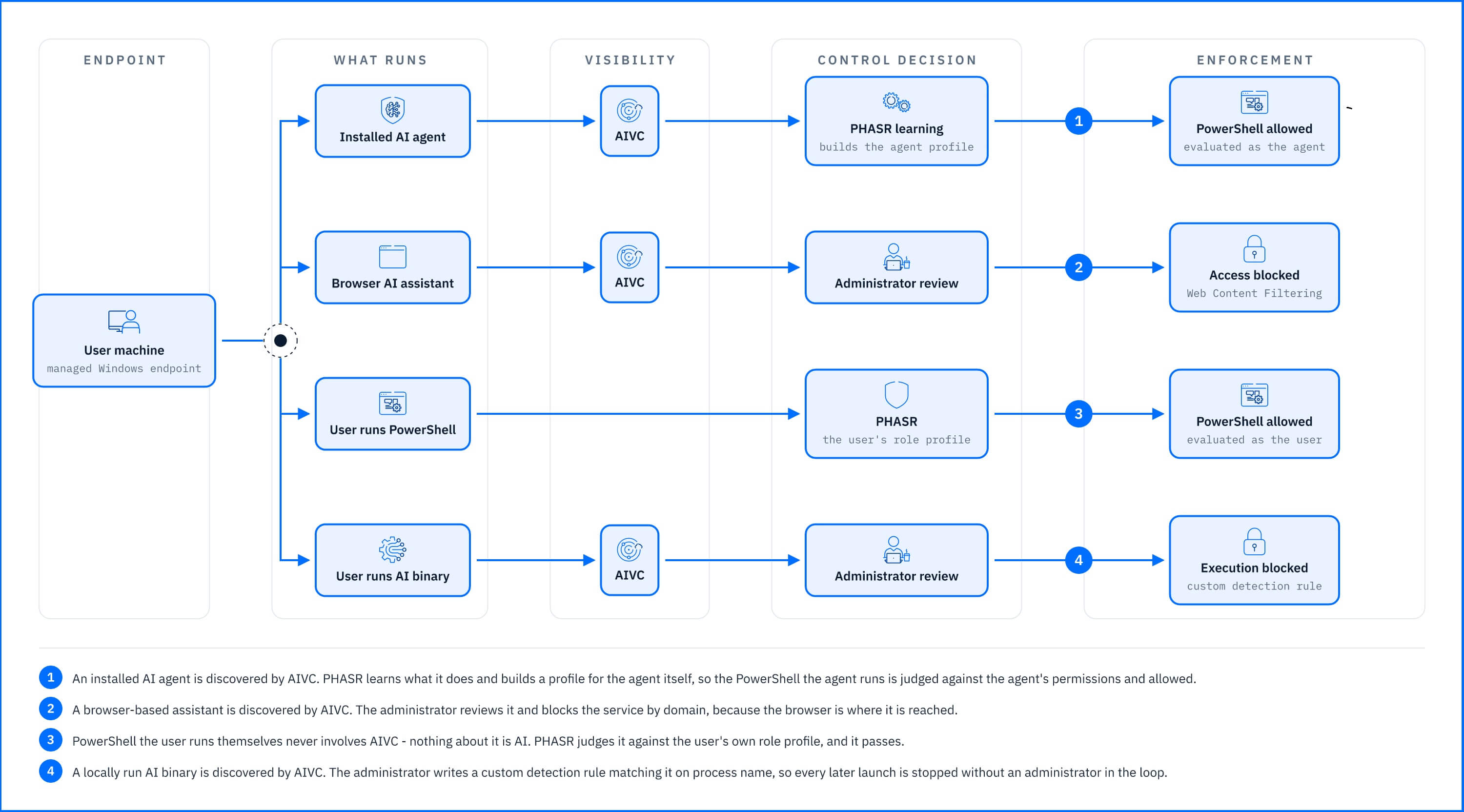 Fig. 2. One endpoint, four paths: what AIVC discovers, what the administrator decides, and which control enforces it |
AIVC establishes what AI is present and what about it is risky. It does not block access, does not remove software, and does not change what a running program is allowed to do. Those are separate jobs handled by controls already in the Bitdefender GravityZone console.
Blocking access to an AI service the organization prohibits you can configure in Web Content Filtering. . Most AI services are reached through the browser, so once AIVC identifies which ones are in use, Web Content Filtering can block the domains.
Blocking a specific tool wherever it turns up is what Custom detection rules do. Once AIVC has named the tool, you can define a rule that matches it, on process name for instance, and attach Kill process as an automatic action, so every later appearance is handled without an administrator in the loop. A rule can target the whole company or only endpoints carrying a given tag.
Reducing what an installed tool is permitted to do on the endpoint belongs to hardening policies and to PHASR. PHASR for AI agents evaluates the agent separately from the person using the machine: processes started by a known agent binary are attributed to that agent's own behavioral profile rather than to the user's session. The agent is allowed the tools its tasks require, while the user's restrictions stay tied to the user's role.
Deployment and Configuration
There is nothing new to deploy. AI Visibility and Control runs on the Bitdefender Endpoint Security Tools (BEST) agent you already have, so coverage does not depend on a rollout project. You turn it on by editing an existing policy: the setting sits in the General section of Risk Management, and it applies to whatever endpoints that policy already targets. Results appear after the next risk scan on those endpoints.
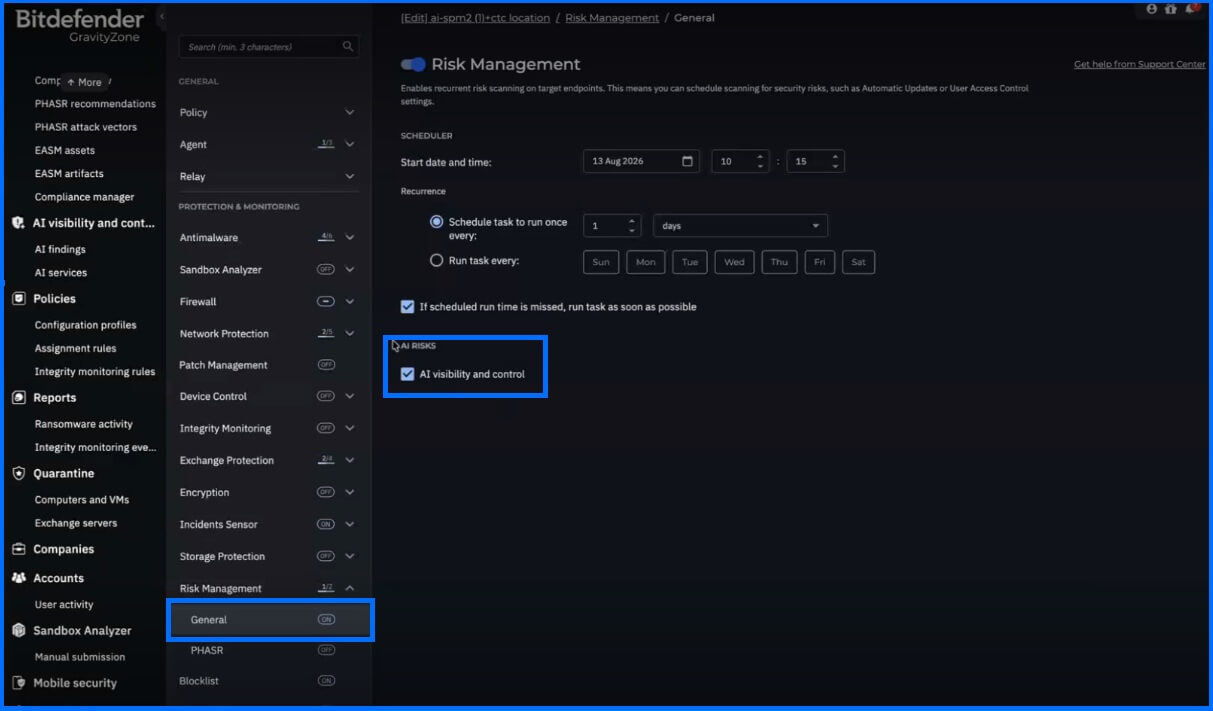 |
Full configuration detail is on the Bitdefender Support Center.
Hands-on Scenarios
The following scenarios demonstrate how you can solve specific challenges using AIVC.
An autonomous agent framework on a developer workstation
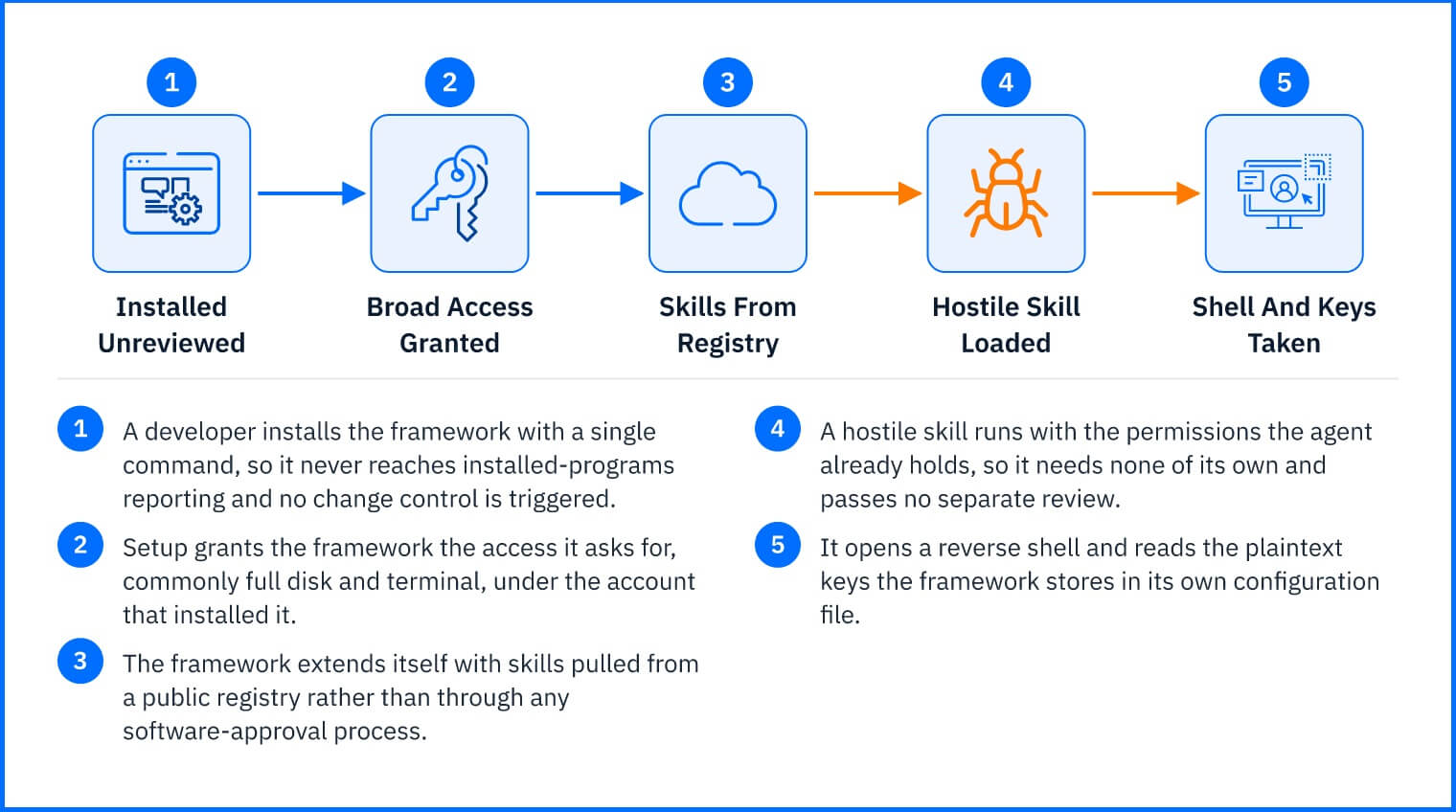
A developer installs OpenClaw, an open-source framework for AI agents that act on the operating system rather than only answering questions. It arrives as a single-line install command, so it never appears in installed-programs reporting, and it runs with whatever the user granted during setup, often full disk and terminal access. It appears in AI Services under Tools and skills with a risk score, and the finding lists the hosts it was observed on.
What matters is not the framework but what it loads. OpenClaw extends itself with skills, code packages pulled from ClawHub, a public registry, and a malicious skill inherits the permissions the agent already holds. Bitdefender has documented skills that open reverse shells and exfiltrate the plain-text API keys OpenClaw stores in its own configuration file.
 |
From the affected-host set you can confirm scope in Live Search. This is one of the cases where the inventory leads to removal rather than tuning: Bitdefender's guidance is not to run OpenClaw on company devices. Where it is still running, PHASR hardens the workstation by blocking at the level of individual actions rather than whole programs, so the agent can be stopped from decoding obfuscated commands, terminating processes, or making silent outbound transfers while it continues to run.
Coding assistants nobody classified as AI
Filtering AI Services to the Coding category returns the assistants running inside editors across the development team, including the ones that were installed as extensions and never appeared in installed-programs reporting. Reviewing them against what your team has actually approved gives you a short list, and for the hosted ones you can block by domain in Content Control. For the ones you keep, the finding detail shows what each one is configured to reach.
The pattern in both cases is the same. The inventory tells you what exists and what about it is risky; the enforcement decision that follows is a separate, deliberate one.
An MCP server nobody installed
A developer connects their assistant to the company's internal ticketing system with a Model Context Protocol (MCP) server, a small connector that gives a model access to another system. It is a few lines in a configuration file, so there is no installer, no entry in installed-programs reporting, and no traffic for a network control to inspect. It appears in AI Services with the assets it exposes listed alongside it.
The question the finding answers is not whether the connector exists but what it reaches. A connector pointed at a read-only reporting view is a different exposure from one holding write credentials to a production database, and that difference lives entirely in its configuration. The affected-host list usually settles a second question: whether this is one developer's shortcut or a pattern the whole team copied from the same internal wiki page.
Common Mistakes and Misconceptions
"Running the model locally means the data is safe."
Keeping prompts off a third-party server is a real benefit, and it is why people install local runtimes in the first place. What it changes is the shape of the exposure, not the degree of it. A hosted assistant leaves a record in your web filtering logs; a local runtime leaves nothing there at all because the traffic never crosses the gateway. Furthermore, local runtimes are ordinary software on the endpoint—carrying the same patching and configuration obligations as anything else, but often running without the review a purchased tool would have received.
"A high risk score means the tool has to go."
The score orders your queue; it does not decide the outcome. Approved tools carry findings, and most findings describe how a tool is configured rather than whether it should exist. For example, a coding assistant that was formally approved by your development team but configured with access to every repository on the machine calls for a configuration review, not removal.
"A score of 0 means the tool is safe to keep."
A score of 0 means AIVC found nothing risky in how a tool is configured, not that your organization approved it. The score cannot see what makes a tool unacceptable for your organization: an unapproved vendor, where data goes, or what your compliance rules allow. A well-configured assistant that nobody sanctioned is still shadow AI. The score describes the tool; approval is still your decision.
"Discovering AI means monitoring what employees do with it."
The agent records what AI software is present and how it is configured. It does not read prompts, chat history, or file content. The distinction is practical rather than legal: it is what lets you run the inventory across the estate, instead of waiting on a consultation process that would delay the answer past the point where it was useful.
"An approved agent with a business license is safe."
A license tells you who is accountable for the agent. It does not vet what the agent loads or what it reads. Commercial agents extend themselves through marketplaces and skill registries on the same pattern as open-source ones, and an extension runs with the permissions the agent already holds rather than with permissions of its own.
The second half of the problem is instruction rather than code. An agent that reads a ticket, a web page, or a shared document is reading content someone else may have written, and an agent that acts on what it reads can be steered by it.
This is why the inventory tracks skills and configuration, not only the name of the product. The approved agent and the agent as actually extended on a given endpoint are two different objects.
"The AI we approved is the AI we have."
Vendor review covers the AI you bought as AI. It does not cover the AI that arrived inside something you bought for another reason. A collaboration suite adds a meeting summarizer, a CRM adds a content generator, a ticketing system adds a reply assistant. Each one ships from a vendor already on the approved list, gets enabled by default or by a tenant administrator, and is re-reviewed by nobody — the procurement event that would have triggered a security review happened years earlier, for a product that did something else at the time.
This is a different blind spot from the unmanaged devices below, and the difference decides who fixes it. An unmanaged device is invisible because the agent is not on it. Embedded AI can be invisible on a fully managed endpoint, because the capability runs in the vendor's tenant rather than on the machine: there is no separate AI application installed, no distinct process to observe, and the domain was allowlisted long before the feature existed.
"If it is not in the inventory, it is not in the organization."
The inventory covers endpoints running the GravityZone agent. Personal phones, contractor laptops, and unmanaged machines are outside its scope—yet browser-reachable assistants are exactly the kind of tool used from those devices. Making unmanaged devices visible is the Network Sensor's job. Knowing which part of the estate the number describes is essential to reporting it accurately.
More Resources
Bitdefender AIVC official website: Bitdefender AIVC
Recommended Content
To learn more about the technologies included in Risk Management we recommend reading the next article Proactive Hardening and Attack Surface Reduction (PHASR).