Demo Attack Path – Bitdefender TechZone
2026-11-16
Meta
This document walks through the GravityZone demo attack path, a built-in example. Bitdefender GravityZone Attack Path connects vulnerabilities, misconfigurations, account risks, and internet exposure into a map of the steps an attacker could take to reach a high-value asset. Designed for customer demos, onboarding, and training, the demo shows how separate weaknesses (an exposed account, a stored credential, a shared folder, unpatched CVEs) add up to one route to a critical workstation, and where a single fix breaks every route to it.
The demo is static, its resources are fictitious, carry the DEMO prefix, and have no impact on your dashboards. Nothing in it runs or touches your environment. You can show or hide it with a button in the toolbar of the Attack Path page, under Risk management.
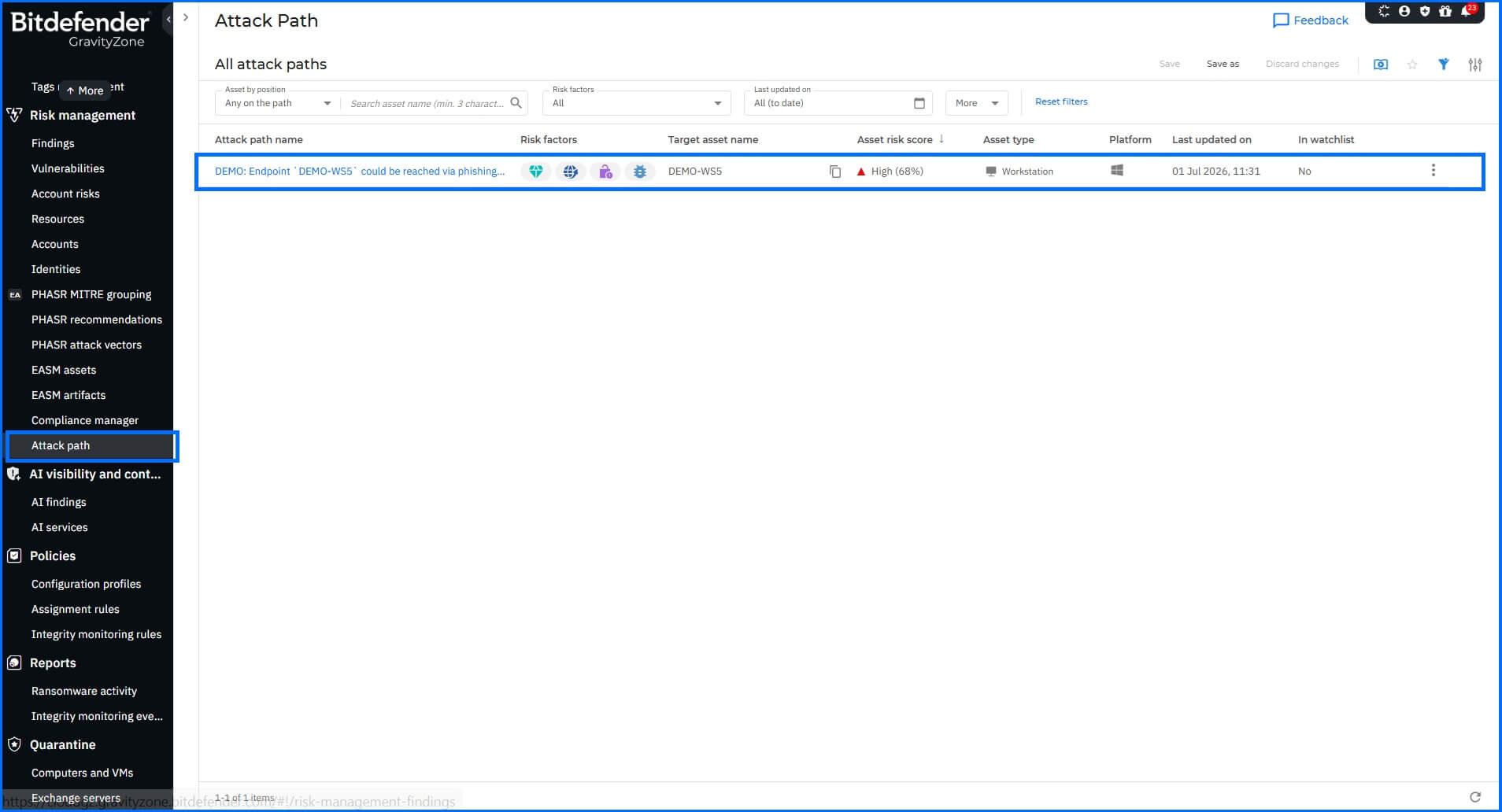 Fig. 1. The demo attack path on the Attack Path page, with its side panel. |
Demo Attack Path Scenario
In the Attack path name column, the demo is listed as "DEMO: Endpoint DEMO-WS5 could be reached via phishing-led lateral movement from User DEMO\Alice". The name alone tells you where the attack starts (DEMO\Alice), how it moves (phishing, then lateral movement), and what it reaches (DEMO-WS5). Selecting the row opens a side panel that summarizes the path, and View details opens the Graph tab, which draws the route from a Threat actor node to the target. Node outlines show risk level (yellow, orange, red for low, medium, high), badges show risk factors, and each edge names the technique behind the next step.
Read the graph in two passes: the shortest path, then the full path. The shortest path reaches the target through four assets, and the graph opens with Shortest path turned on, so this route is highlighted first. The full attack path adds five assets that open alternate routes; in the collapsed view, they sit in one group of 5 nodes.
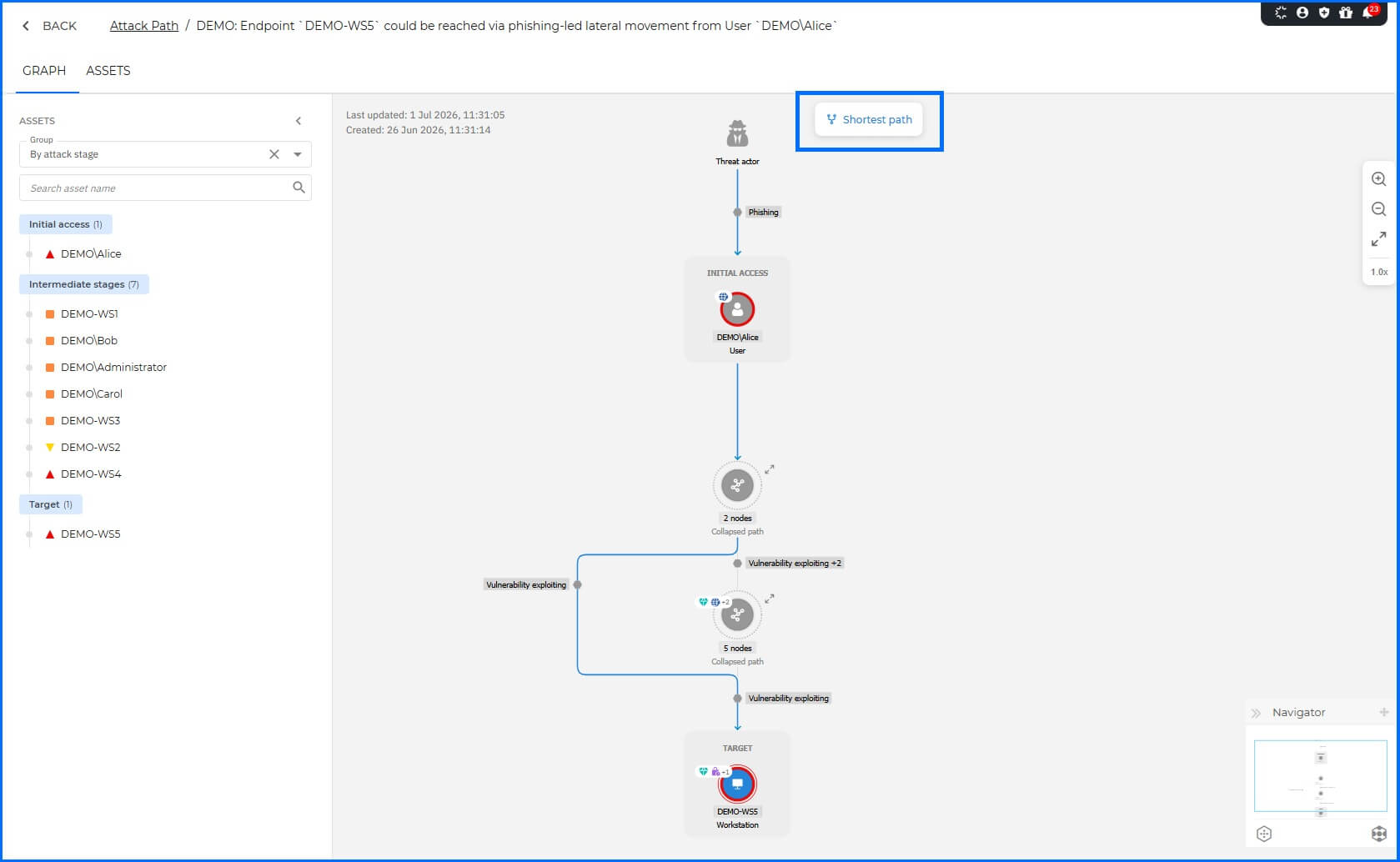 Fig. 2. The demo path in the collapsed view, with Shortest path turned on. |
The shortest path: DEMO\Alice, DEMO-WS1, DEMO\Bob, DEMO-WS5
1. Initial Access (Phishing). The attacker starts with DEMO\Alice. Her email address is publicly exposed and she reuses her password on external sites, so one phishing email or one leaked password could be enough to take over her account.
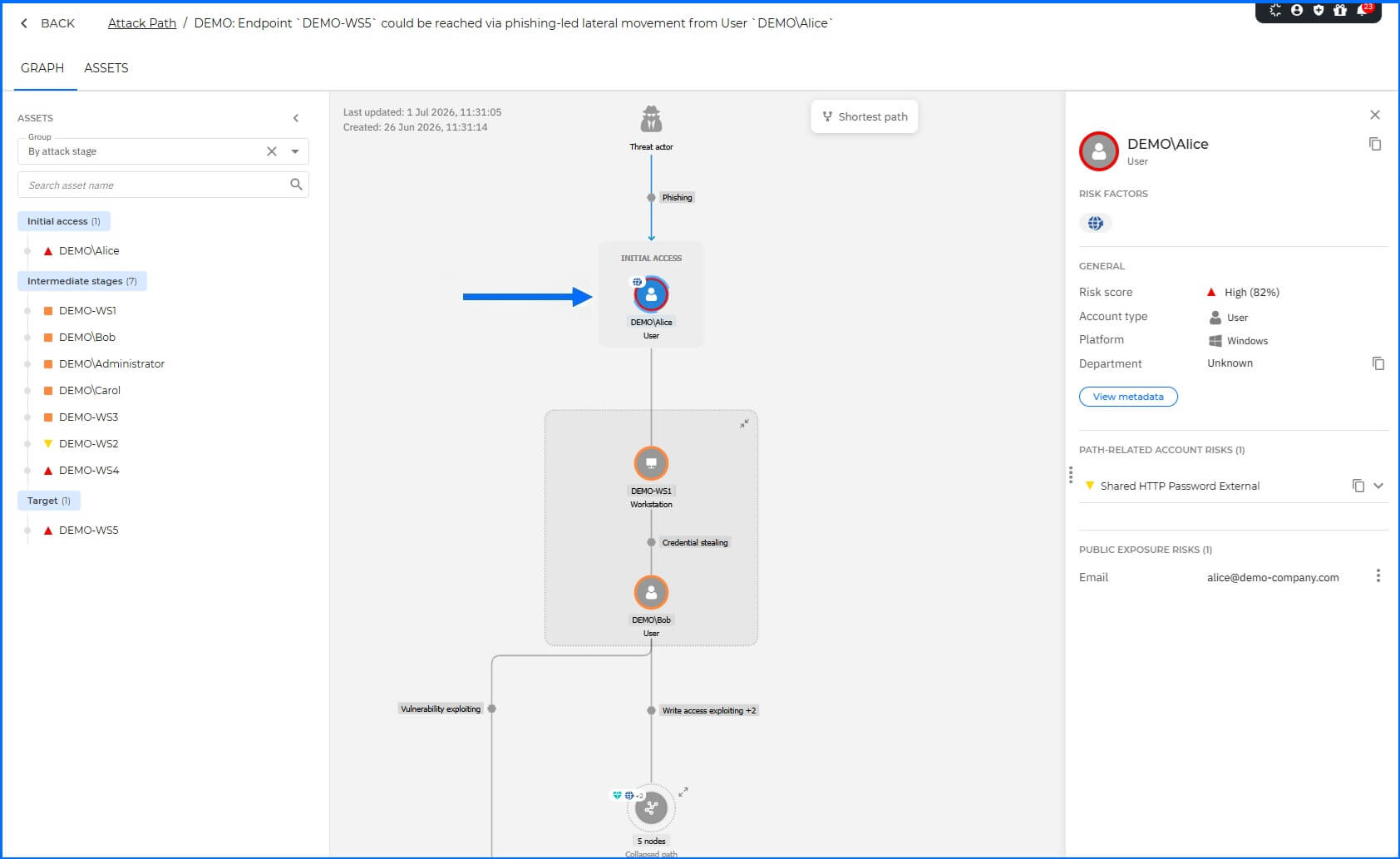 Fig. 3. DEMO\Alice, the entry point of the demo path. |
User Risk Management flags the reuse as the Shared HTTP Password External account risk.
2. Endpoint Access (DEMO-WS1). With Alice's account, the attacker would log into DEMO-WS1, the only endpoint connected to her. There, network authentication credentials are stored on the local computer.
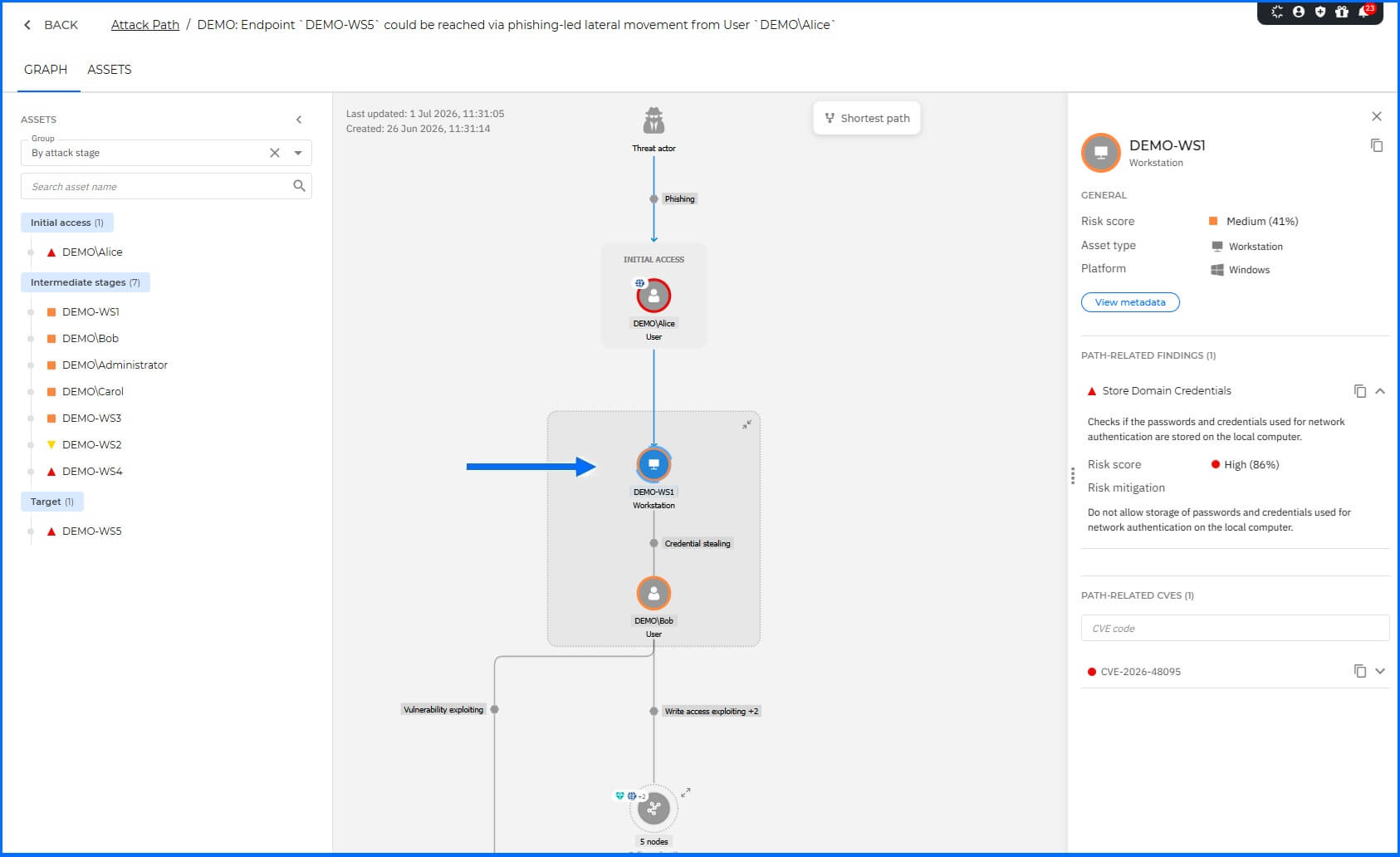 Fig. 4. DEMO-WS1, the first compromised device. |
Endpoint Risk Management reports this as the Store Domain Credentials finding, High (86%). The node also lists CVE-2026-48095, which opens the next step.
3. Credential Access (DEMO\Bob). By exploiting CVE-2026-48095, the attacker would extract Bob's stored credentials from DEMO-WS1. Bob's account is connected to 21 endpoints, DEMO-WS5 among them, and every route to the target continues from him.
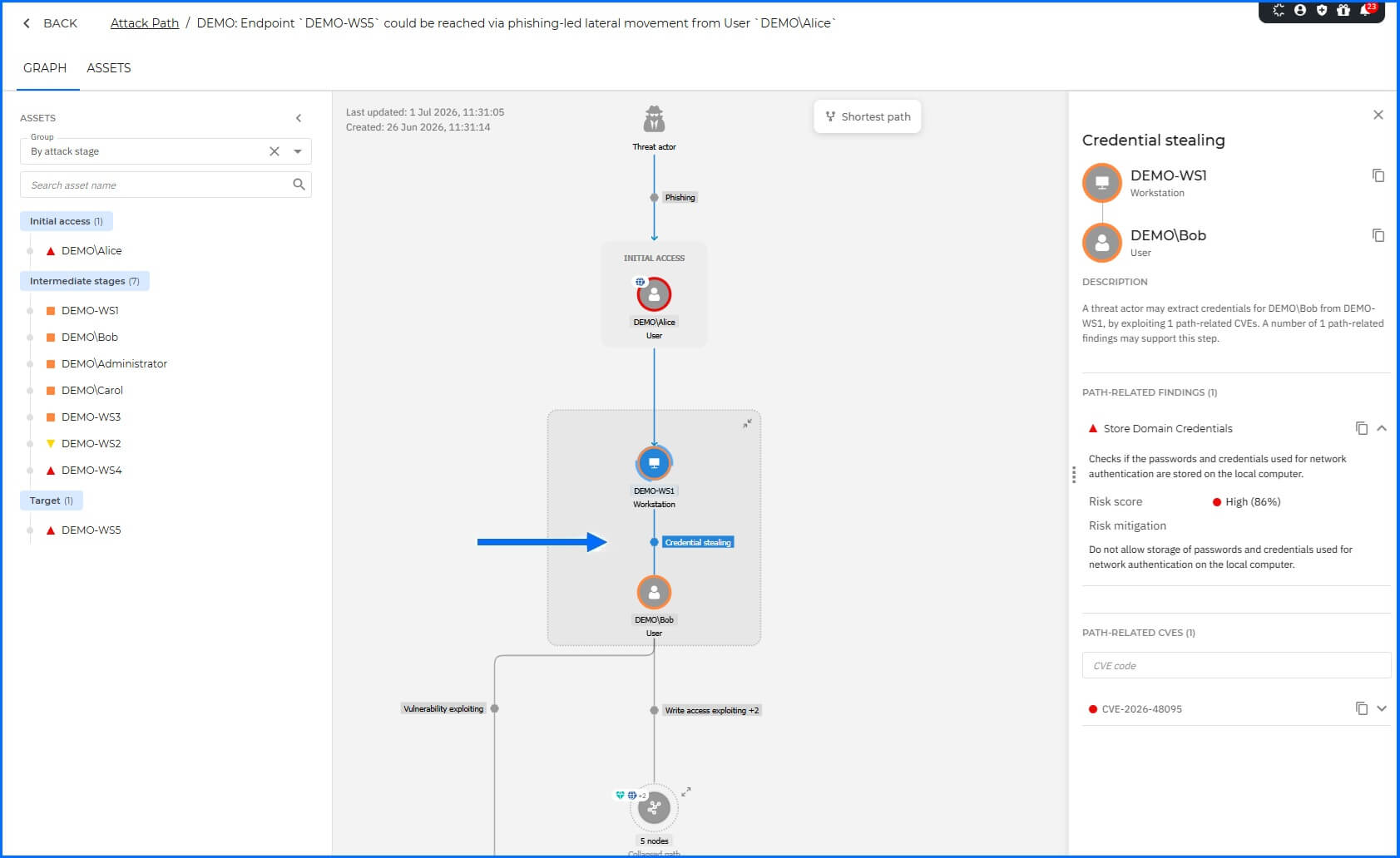 Fig. 5. The Credential stealing edge that hands DEMO\Bob to the attacker. |
No layer flags Bob on his own: Medium (37%) risk, no account risks.
4. Privilege Escalation (DEMO-WS5). With Bob's account, which is connected to DEMO-WS5, the attacker would exploit any of the 28 high-severity CVEs on DEMO-WS5 to gain elevated access: four assets from a phishing email to a critical workstation.
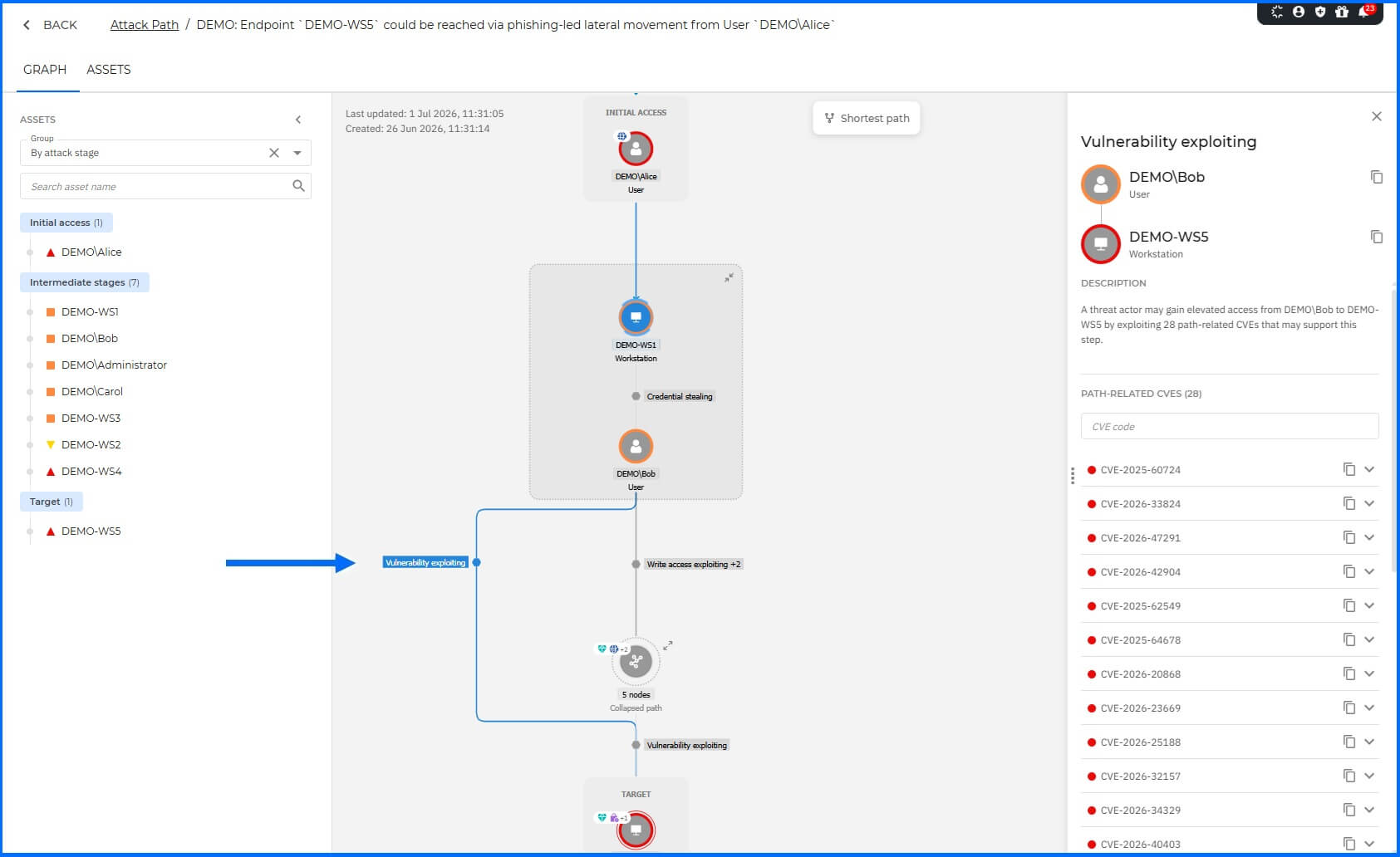 Fig. 6. DEMO-WS5, the target, with 28 path-related CVEs. |
The CVEs come from GravityZone Risk Management vulnerability data. DEMO-WS5 carries the Critical asset, Exploitable CVE, and High-severity CVE risk factors and a High (68%) risk score.
The full attack path: five more assets
Expanding the group of 5 nodes shows five more assets: DEMO-WS2, DEMO-WS3, DEMO-WS4, DEMO\Carol, and DEMO\Administrator. All branch from DEMO\Bob and lead back to the target.
5. Lateral Movement (Write Access). The attacker could use Bob's account to modify content on DEMO-WS2, which shares folders with the Everyone group.
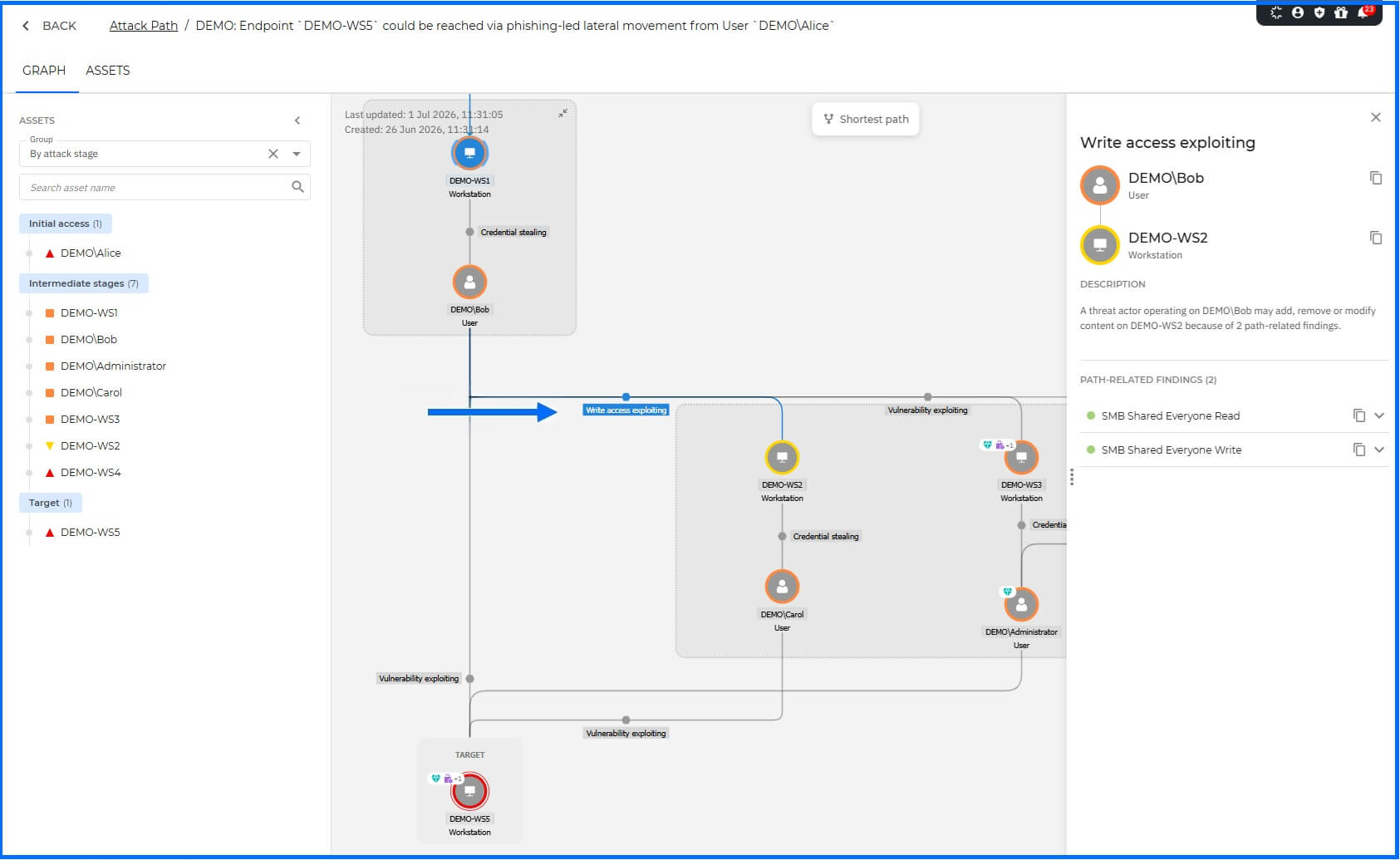 Fig. 8. Write access to DEMO-WS2 through folders shared with Everyone. |
Endpoint Risk Management reports the SMB Shared Everyone Read and SMB Shared Everyone Write findings. With a Low (27%) risk score, DEMO-WS2 still sits on a working route.
6. Lateral Movement (Vulnerabilities). The attacker could also reach DEMO-WS3 and DEMO-WS4 through CVE-2026-20856. DEMO-WS3 is a critical asset, and DEMO-WS4 is reachable from the internet.
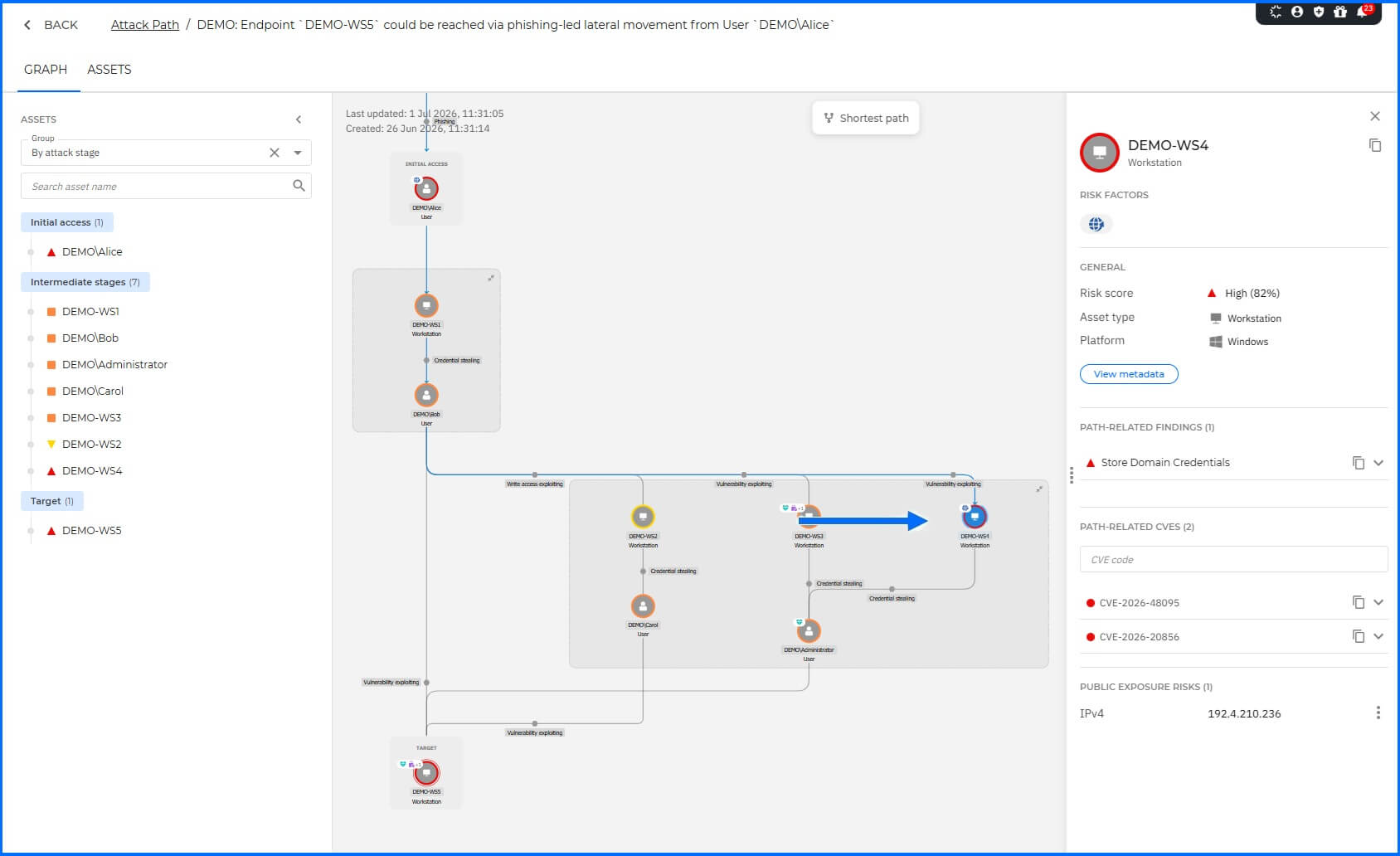 Fig. 9. DEMO-WS4, an exposed workstation one hop from DEMO\Bob. |
EASM lists a public IPv4 address for DEMO-WS4, which has a High (82%) risk score. DEMO-WS3 has the target's three risk factors but only a Medium (32%) score: criticality and risk score measure different things.
7. Credential Access (Second Round). All three workstations store domain credentials. DEMO-WS2 would hand over DEMO\Carol, and both DEMO-WS3 and DEMO-WS4 would hand over DEMO\Administrator, a critical asset.
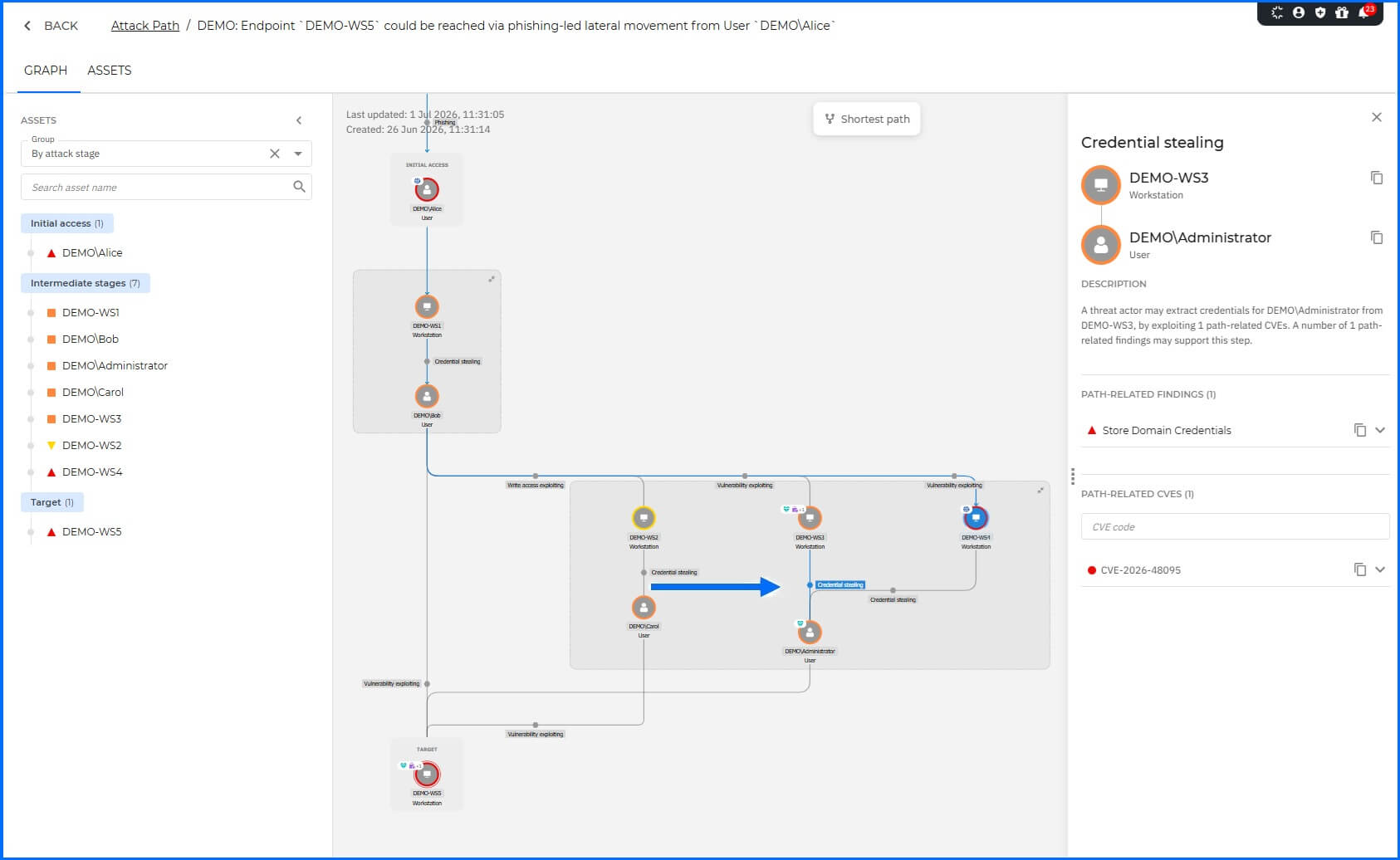 Fig. 10. Two workstations lead to the same administrator account. |
Each edge relies on Store Domain Credentials and CVE-2026-48095, the pair that opened Bob. With two workstations leading to DEMO\Administrator, fixing only one leaves the account reachable.
8. Alternate Routes to the Target. DEMO\Carol and DEMO\Administrator both reach DEMO-WS5 through the same 28 CVEs as Bob's direct route. Carol, like Bob, is connected to DEMO-WS5, and the Administrator route joins Bob's edge just before the target. In total, four routes reach DEMO-WS5 from DEMO\Bob: directly, through DEMO-WS2 and DEMO\Carol, through DEMO-WS3 and DEMO\Administrator, and through DEMO-WS4 and DEMO\Administrator.
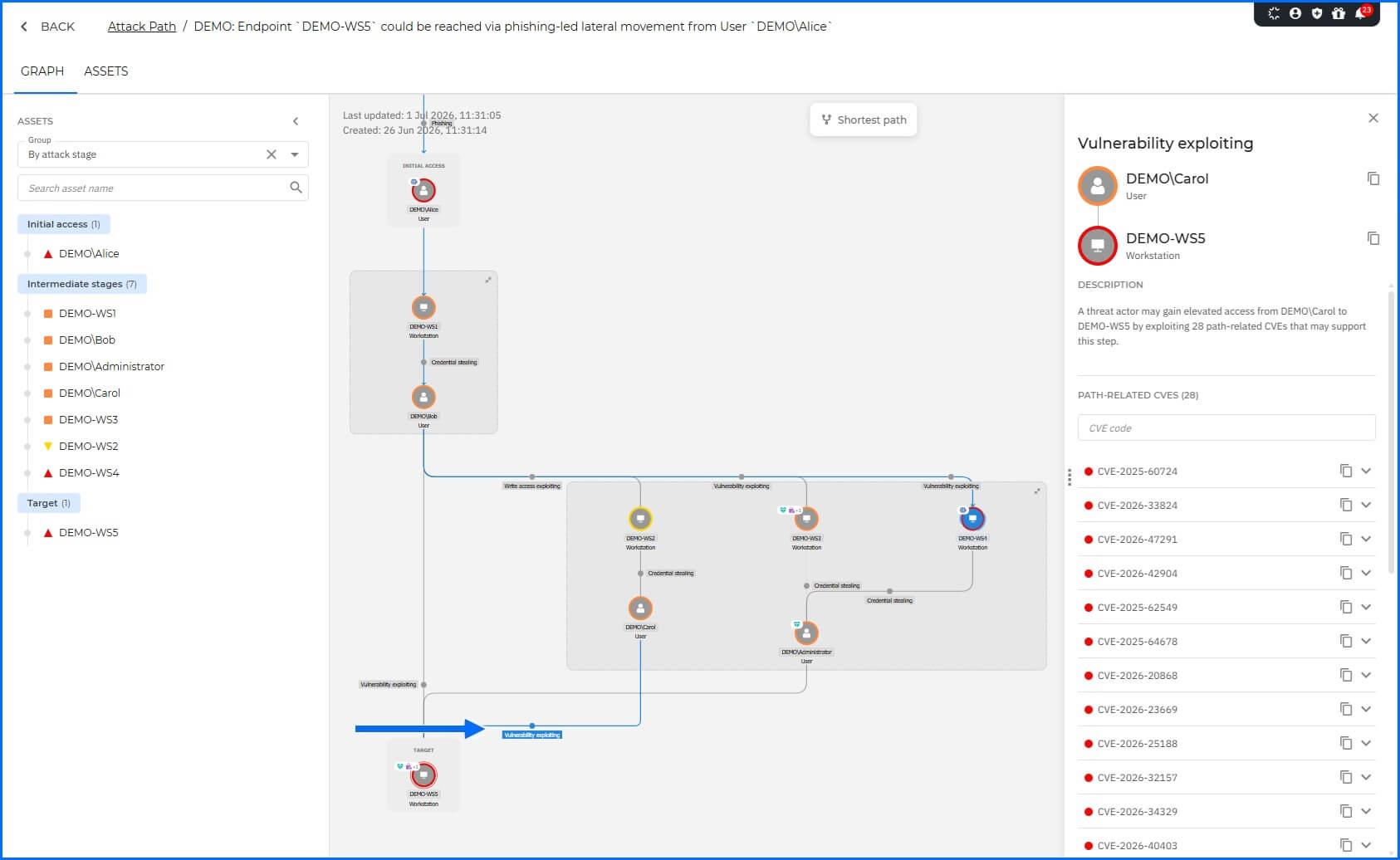 |
Carol's node shows nothing alarming: Medium (45%), no risk factors. The graph keeps these branches even with Shortest path on, because closing the direct route does not put the target out of reach.
Reading the Path: Choke Points and Remediation Priorities
The choke point: DEMO\Bob. Bob's own risk score is only Medium (37%), yet every route to DEMO-WS5 continues from his account, and the attacker can get it only from DEMO-WS1. Removing the locally stored domain credentials on DEMO-WS1 (the Store Domain Credentials finding) and patching CVE-2026-48095 blocks all four routes with a single fix.
A severity-sorted list would put DEMO-WS5 first, but patching it closes only the last hop of each route. Every route passes through DEMO\Alice, DEMO-WS1, and DEMO\Bob before it splits, so a fix on any of them breaks every route below it. Ending Alice's password reuse works one step earlier, and removing stored credentials on all four workstations closes every credential-stealing hop.
The Assets tab confirms it: three assets are critical (DEMO-WS5, DEMO-WS3, DEMO\Administrator) and two are publicly exposed (DEMO\Alice, DEMO-WS4), while DEMO-WS1 and DEMO\Bob carry no risk factor. A list filtered by risk factor would miss them.
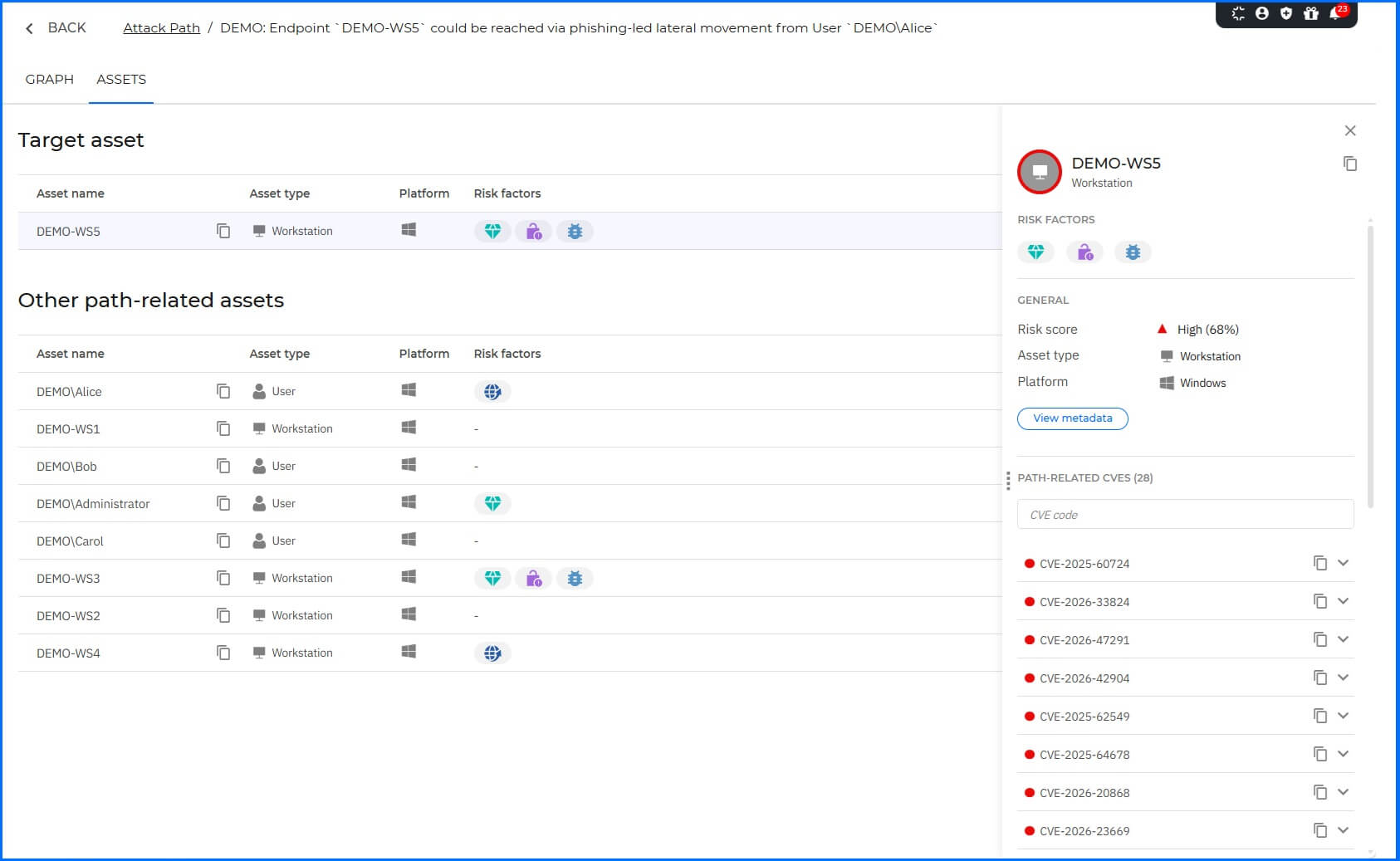 Fig. 12. The Assets tab of the demo path. |
Demo nodes offer only View metadata, which shows the raw JSON behind a node, such as connected endpoints. On real paths, View asset and View account open the Resources and Accounts pages, and fixes happen in the layers that own them, such as Patch Management. Attack Path does not remediate anything itself: a path describes what could happen, built from scan and inventory data.
Attack Path on your own environment requires the Exposure Management license. There, paths are built from Risk Management, account, cloud, and EASM data, and each shows when it was created and last updated. For the full description, see Attack Path Analysis.
Attack Path Demo Video
More Resources
How to interpret the demo attack path: Bitdefender Support Center
The Attack Path page: Bitdefender Support Center
Viewing attack path details: Bitdefender Support Center
From Vulnerability Management to Exposure Management: Bitdefender TechZone white paper