Managing Shadow AI Risk – Bitdefender TechZone
2026-09-23
Shadow AI agent frameworks execute code with unreviewed permissions, connect to internal systems via MCP servers using static credentials, and install from untrusted registries. OpenClaw example: 20% of public skills were malicious; 53% of MCP servers use long-lived static API keys.
Employees across the enterprise are running AI systems that their organizations cannot inventory, cannot log, and in a growing number of cases cannot even see. The exposure has changed shape: what began as staff pasting source code into chat windows now includes users installing autonomous agent frameworks that execute code with the permissions of the account that installed them. Licensing an approved AI tool does not close this gap, because the sanctioned tool and the unsanctioned ones coexist on the same endpoints. Regulation now assumes organizations know which AI systems they operate, and most do not.
Multiple Services Behind One License
Consider an organization that had done what the market recommends: it evaluated AI vendors, selected one, paid for it, and rolled it out under corporate licensing with IT approval. Yet while that sanctioned deployment was live, staff at the same organization had used multiple other unsanctioned LLM services, including DeepSeek and voice-cloning tools. The critical detail is that they did so alongside an approved tool funded and supported by procurement.
When the phenomenon of "shadow AI" emerges, it is reflexively viewed as an issue of availability. The main reason that employees turned to unauthorized tools is because official solutions were missing the right functionality. Employees select whichever tool is closest to the task in front of them. DeepSeek and voice-cloning tools are not substitutes for a general-purpose assistant. Procurement reviews data security posture, negotiates confidentiality agreements, and verifies compliance certifications—all real safeguards against the wrong problem.
To create a full picture of AI usage, you can use tools like GravityZone AI Visibility and Control (AIVC) that report the AI services on managed endpoints. In Bitdefender's 2026 Cybersecurity Assessment, 47.4% of respondents acknowledged only partial or no visibility into shadow AI tools and personal AI accounts used for work, and managers reported full visibility markedly more often than the practitioners in the same organizations — 57.8% compared to 45.9%.
Measuring What You Cannot See
Verizon Data Breach Investigations Report, May 2026 shows the pattern at scale. Shadow AI is now the third most common non-malicious insider action in the data loss prevention dataset, a fourfold increase over the previous year. Regular AI usage on corporate devices, whether authorized or not, reached 45% of employees against 15% in the prior year.
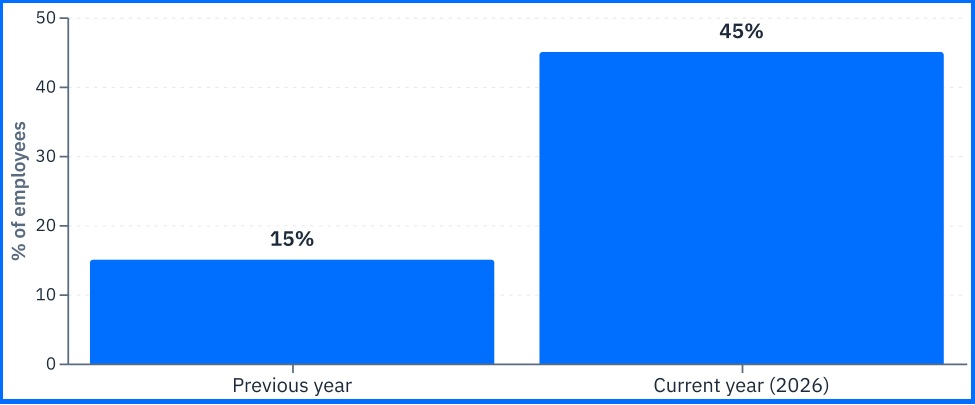 Fig. 1. Regular AI users on corporate devices |
The critical visibility gap: 67% of those users access AI services through non-corporate accounts on corporate devices. This is the mechanism that makes the rest invisible. A corporate account produces an audit trail: the organization can query usage, review retention settings, enforce enterprise terms, and in most cases contractually exclude submitted content from model training. A personal account on a corporate endpoint produces nothing the organization can query. The data leaves through a browser session or a desktop agent. In this case, the enterprise agreement the legal team negotiated does not apply, because the employee is not operating under it.
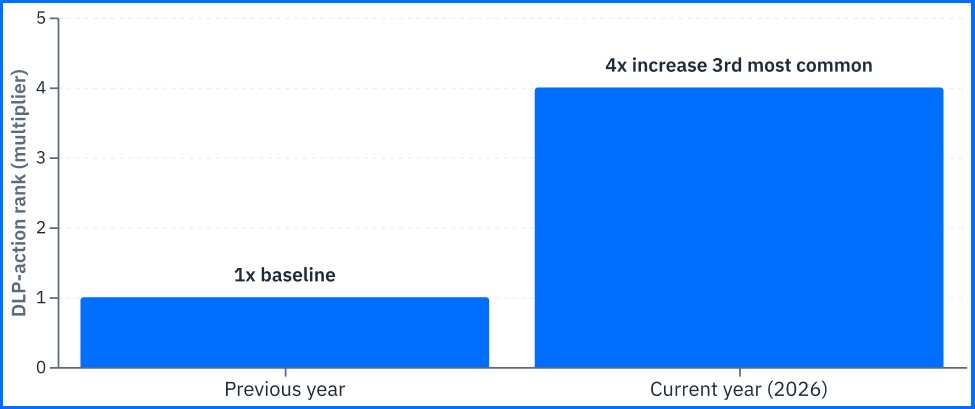 Fig. 2. Shadow AI as a non-malicious insider DLP action |
Bitdefender AIVC reports what AI software is present and running on a managed machine regardless of which account it is signed into, making mentioned 67% visible.
The Data Leaving the Organization
Shadow AI moves three categories of business-critical data, each with distinct consequences.
Source code discloses intellectual property and product roadmap. A competitor who obtains an unreleased module learns what is being built and how it is designed. The architecture disclosure often turns out the feature disclosure in value: features always become public, while the decisions underneath them persist across releases.
Internal documentation discloses process and, frequently, vulnerability. A runbook explaining which service account performs a nightly restore, and where its credentials live, is an operational playbook and valuable asset for attackers. Architecture documents name the components that were never meant to be enumerated externally, including the ones running versions the organization has not yet upgraded.
Credentials are the category the data does not capture, because they arrive inside pasted code and configuration files rather than as documents in their own right. The distinction matters for response: every other category is information an outside party might eventually act on, while a leaked key is access that already exists.
The coding assistant is where these three meet: it runs inside an editor that already holds the repository, and frequently the configuration files and credentials sitting in the same working directory. Bitdefender AIVC lists these under its Coding category, including the ones installed as editor extensions.
Convenience as the Dominant Motive
The motive matters for control design. In the Verizon DBIR, Convenience leads the motives in the Privilege Misuse pattern at 60%, ahead of Financial at 33%. Insider threat programs are created for an adversary, applied to internal users whose motive is finishing work faster, those controls doing nothing about the risk that produced the behavior. At the same time those controls produce more workarounds and user creativity. The employee blocked from one service does not stop; they find the one that is not blocked yet, which is by definition the service the security team knows least about.
Agent Frameworks and the Permission Boundary
Chat tools
A chat tool is a conversational AI assistant where users type prompts, reached through a browser tab, a desktop client, a browser extension, or an AI feature built into a SaaS application the organization already pays for. None of these accesses requires an installer or a procurement decision — a browser tab and an account are enough, and the account is frequently a personal one. The exposure has the same shape no matter the route it arrives by. The tool sees what the employee puts in front of it and nothing more: it does not read the disk, invoke commands, or take actions of its own. That exposure is also a bounded one, and the limit is what a single person can paste into a session.
Agent Framework
An agent framework is a different class of software. It runs with the permissions of the account that installed it, reads and writes files, invokes shell commands, calls network services, and takes actions without a human approving each one. When an employee installs one on a corporate endpoint, the governance question stops being “what data can leave this session” and becomes “what can this software do on this machine”. That changes how internal risk has to be modeled. Organizations assign risk to a machine or to a user, because those are the two things they can enumerate and hold accountable. An agent is neither. It acts under a user's account while doing things that user never would, so its behavior lands in the risk model as theirs. Policy does not close that gap, because acceptable-use policies govern how people behave, not what privileges software holds.
Real-World Example
Bitdefender’s Technical Advisory: OpenClaw describes an open-source AI agent framework with roughly 160,000 GitHub stars, widely installed by employees without IT review. Roughly 20% of the skills in its public registry, ClawHub, were found to be malicious. The framework grants system-wide permissions by design. On an unreviewed corporate endpoint, an employee has created a high-privilege, ungoverned system sourced from a registry where one component in five was hostile. The organization has no record that the installation happened and no policy that covers data the agent reads directly from disk. Data loss controls inspect what a person moves; an agent reading a file to answer a question it was given never generates the event the control was built to catch.
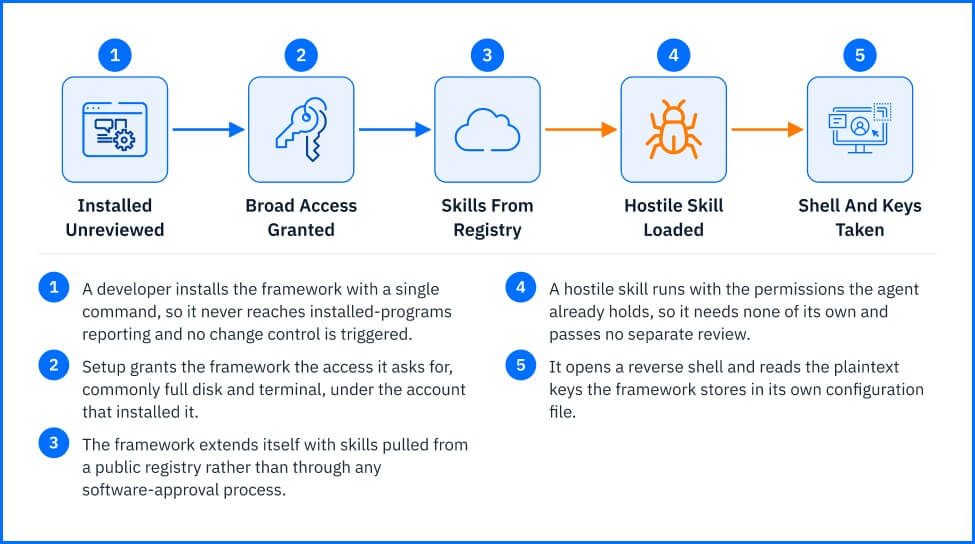 Fig. 4. An agent framework installed without review extends its own permissions to every skill it loads |
The scale changes the character of the problem. The same advisory notes that bring-your-own-AI adoption is spreading beyond technical users to general employees.
Model Context Protocol: How Agents Reach Other Systems
The Model Context Protocol (MCP) is the standard interface that lets an AI agent reach past the endpoint it runs on — calling databases, code repositories, ticketing systems, and internal APIs as tools. Astrix Security research, analyzing more than 5,200 open-source MCP server implementations, found that 53% rely on long-lived static credentials such as API keys, while only 8.5% use OAuth. A static key does not expire on its own, and its scope is fixed when it is issued, so anything that can read the configuration file it sits in inherits the full access it carries. During an incident, revoking a static key means finding every place it was copied; an OAuth token can be revoked once, centrally.
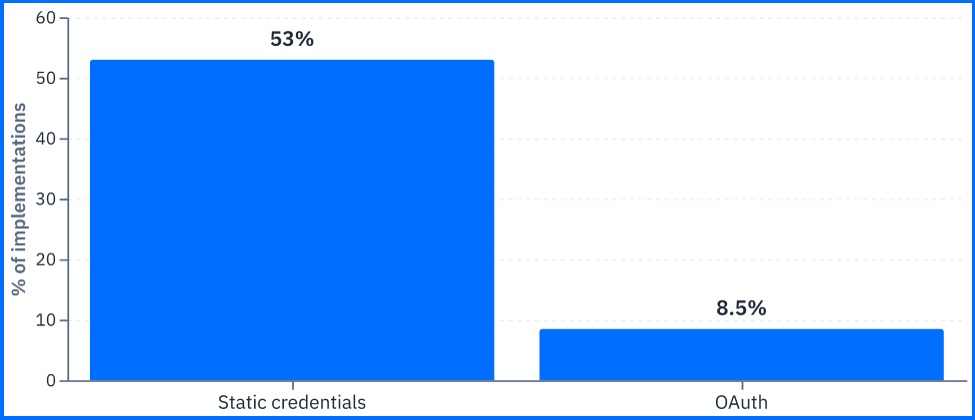 Fig. 5. Model Context Protocol (MCP) authentication methods. |
Bitdefender AIVC records the configured scope of those connections, which is what makes a finding actionable: a connector pointed at a read-only reporting view is a different exposure from one holding write credentials to a production database.
Coding Agents and Unreviewed Installs
AI coding agents read more than the repository they are working in. Vendors publish llms.txt files — machine-readable manifests placed on a website for AI agents to find, describing what to fetch and which commands to run. No person reads them, no mail gateway inspects them, and no procurement process evaluated them.
Research across 8,565 of these files, spanning 6,214 active domains, found more than 237 referenced packages that were unclaimed and unverified. Researchers registered a sample of those names with a harmless callback and received their first response from a Fortune 500 network in under four minutes — no phishing lure, no exploited vulnerability, no human interaction. The agent found the documentation, read the install command, and ran it.
The governance failure is that an organization permitted software to install and execute code based on an input no reviewer ever saw.
The OWASP Entries That Describe Deployment Risk
The OWASP GenAI project publishes two current risk taxonomies: the OWASP LLM Top 10 2026 and the OWASP Top 10 for Agentic Applications 2026. Six entries across the two describe risks that organizations create through their own deployment and configuration decisions.
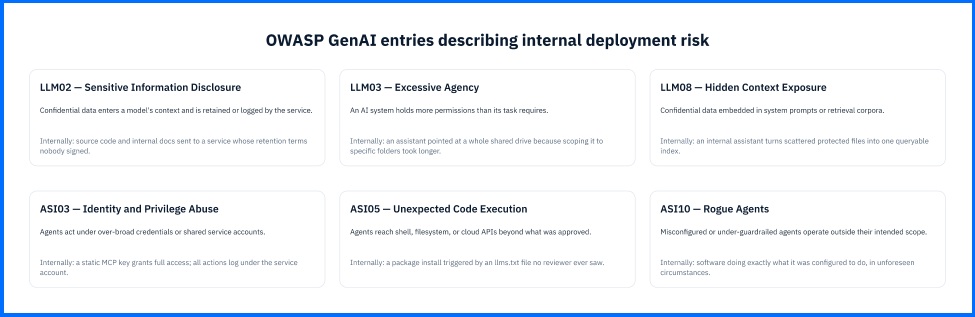 Fig. 6. Six OWASP GenAI entries that organizations create through deployment and configuration decisions |
Sensitive Information Disclosure (LLM02). Confidential data entering an AI model’s context and being retained, logged, or exposed through the service. On a corporate endpoint this is the source code and internal documentation the breach data measured, moving into a service whose retention terms nobody read because nobody signed the agreement. There is no event to respond to: the data is gone at the moment of submission.
Excessive Agency (LLM03). An AI system deployed with more permissions than its task requires. In practice this is an assistant granted broad access because scoping it narrowly took work the person deploying it did not have time for: pointing at the root of a shared drive and enumerating the four folders it actually needs. The over-broad grant stays invisible until the system takes an action.
Hidden Context Exposure (LLM08). Confidential data contained in system prompts or document sets used for information retrieval, configured by employees unaware of the risk of disclosure. These are typically created as part of an internal assistant, populates it with documentation to ensure its utility, and builds an index enabling searches across materials that were previously protected simply because they were scattered and difficult to locate.
Identity and Privilege Abuse (ASI03). Agents operating under over-broad credentials or service accounts — the static MCP keys above in concrete form. What makes it harder than conventional service account sprawl is attribution: actions taken by an agent under a shared service account appear in logs as the service account, so an investigation cannot distinguish the agent’s activity from anything else using the same identity.
Unexpected Code Execution (ASI05). Employee-deployed agents with unintended access to shell, filesystem, or cloud APIs, taking actions that exceed anything a human reviewer approved. The llms.txt pattern above is a specific instance; the general shape is broader. An agent given a task it cannot complete within its intended capabilities will reach for one it was not.
Rogue Agents (ASI10). Agents operating outside their intended scope due to misconfiguration or inadequate safeguards. Although often mistakenly viewed as the stuff of speculative scenarios, in practice they represent the most mundane of the cases discussed: software performing exactly as configured, yet under circumstances unforeseen by the person responsible for that configuration.
The thread connecting all six is the same. Each describes a permission or configuration decision the organization made, not an attack it suffered. Four of the six are permission decisions taken at deployment, which is also where they are cheapest to reverse. PHASR addresses them at that point by giving an AI agent a behavioral profile of its own, separate from the user operating the endpoint, so the agent’s reach is scoped to its tasks rather than inherited from whoever installed it.
What the EU AI Act Requires
The European Commission began enforcing the EU AI Act’s transparency rules, and the enforcement powers attached to them, in August 2026. The Act’s provisions phase in across several dates, so this is not the whole regime arriving at once. What is live now is specific: AI chatbots must identify themselves as AI, and AI-generated content must be labeled.
Regulation converts the inventory problem from a security preference into a compliance obligation. Transparency and documentation requirements presuppose that an organization knows which AI systems it operates. An organization that cannot enumerate its AI systems cannot label AI-generated content.
Detecting Shadow AI
An inventory built once is a snapshot; keeping it current means turning shadow AI into visibility.
Every signal here is scoped to managed endpoints, corporate identities, and sanctioned tenants. A personal device on a personal network falls outside all of it.
List of outbound traffic destinations. DNS resolution and connection telemetry from managed endpoints to known AI service endpoints, including AI features hosted inside otherwise-sanctioned SaaS platforms. While useful for inventory purposes, this information holds little value as a standalone source of alerts; it reveals which AI services are being used and by whom, but does not indicate whether any data was exposed during a given session.
Prompt volume and payload shape. Sustained outbound text volume to an AI endpoint from a single user or host, measured against that user’s own baseline and against the baseline for their role. This method determines the scale of data exposure rather than data sensitivity: a developer pasting large code generates the same traffic pattern as someone pasting an exported customer database.
Agent-framework process behavior. A local process associated with an agent framework or an MCP server reading across the filesystem, spawning shell commands, and opening outbound connections. This indicator is characterized by moderately high reliability on a managed endpoint, as the activity differs from an interactive chat session and leaves no trace in the provider's console. It serves as a signal for detecting a type of risk that chat-oriented DLP policies failed to identify.
Attribution is what makes that third signal usable. PHASR identifies an AI agent through a maintained list of known agent binaries combined with process lineage, so a process started directly or indirectly by a known agent parent is evaluated as the agent’s activity rather than the user’s. Without it, agent-spawned and user-run commands arrive in the same session, indistinguishable.
Building the Inventory
The sequence below is ordered deliberately, and the ordering is itself the recommendation: instrument first, govern second.
Immediate. Inventory every AI tool in use, including the ones nobody approved. Triage that inventory on two axes, not one: what is misconfigured, and what was never sanctioned. The second list is longer, and nothing on the endpoint can generate it for you. Run the discovery on the endpoint rather than from a vendor console or a staff survey: the Verizon Data Breach Investigations Report found that 67% of employees using AI on corporate devices do so through non-corporate accounts, which leave no record in any enterprise tenant an administrator can query, and a survey measures only what people are willing to report. Endpoint discovery has three surfaces — installed software and browser extensions, outbound connections to known AI service domains, and locally running processes belonging to agent frameworks and Model Context Protocol (MCP) servers, the connectors that hand an AI tool access to another system. The third surface is the one most organizations have never looked for, and where the highest-privilege software will be found, because an agent framework runs with the permissions of whoever installed it. Alongside the inventory, classify the data sensitivity levels in the environment and extend content inspection policies to cover uploads to AI services, which most policies written before 2025 do not enumerate.
Short-term. Write the AI governance policy against the inventory rather than against assumptions. A policy drafted from what endpoint discovery actually found will govern the tools employees use, which is a different list from the one a policy template anticipates. Review any deployment where an AI system acts on its own — installing software, calling APIs, running commands — against the OWASP Top 10 for Agentic Applications, and treat installing one as a change control event rather than a software preference.
Strategic. Move from a point-in-time inventory to continuous monitoring of AI data flows. Shadow AI quadrupled year over year in Verizon's data loss prevention data, so an inventory compiled once is out of date by the time it is finished. Separate the permissions an AI agent holds from the permissions of the employee whose endpoint it runs on, so that granting an agent the tools its task requires does not silently widen what the person can reach — in GravityZone this is PHASR for AI agents, which treats each agent as a behavioral profile of its own. Align the acceptable-use framework with whichever transparency and documentation obligations apply in the jurisdictions you operate in, so that the security inventory and the compliance record are the same document.
How Bitdefender GravityZone Discovers and Controls AI
Finding shadow AI and acting on it are two different jobs, and Bitdefender GravityZone separates them deliberately. AI Visibility and Control produces the inventory and the ranked findings; Web Content Filtering, custom detection rules, and PHASR act on what it finds.
AI Visibility and Control (AIVC) runs on the Bitdefender Endpoint Security Tools agent already deployed on protected Windows endpoints. Collection is minimized by design — the agent records what AI software is present and how it is configured, not prompts, chat history, model weights, credentials, or file content. Two views carry the output: AI Services for what is running, and AI Findings for what to look at first, each backed by endpoint-specific evidence that gives an investigation a host set to pivot from. Keep in mind that a service can appear in AI Services with no findings at all. That means nothing technically wrong was detected, not that the service is approved: whether a clean but unsanctioned tool is acceptable is a question the organization's security policy answers, not the risk score.
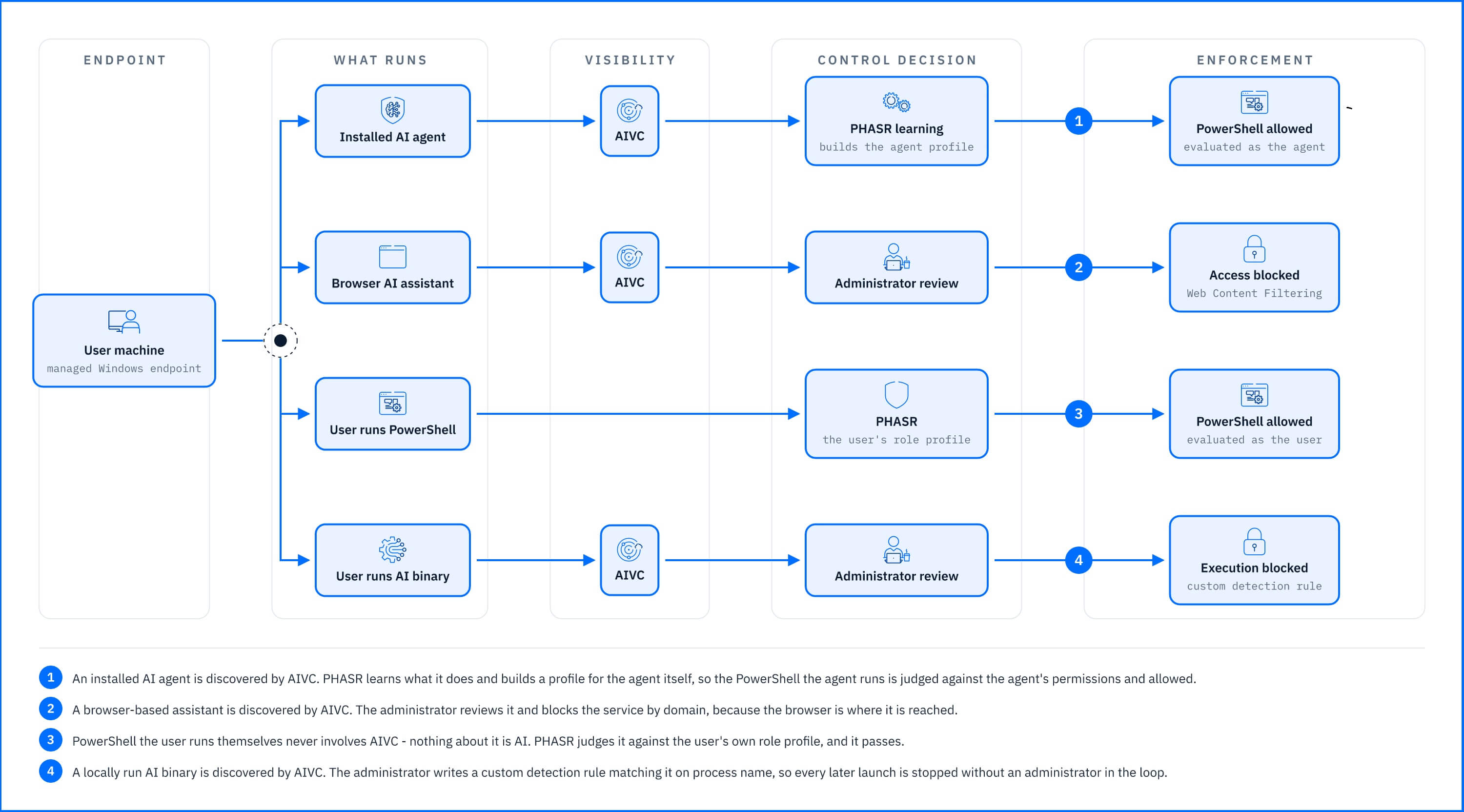 Fig. 7. One endpoint, four paths: what AIVC discovers, what the administrator decides, and which control enforces it. |
Enforcement is where the separate controls come in. Web Content Filtering blocks the services the organization prohibits. Custom detection rules match a named tool on process name with Kill process attached, so later appearances need no administrator in the loop. PHASR reduces what an installed tool may do, blocking individual actions rather than whole programs. PHASR for AI agents draws the permission boundary, treating each agent as a behavioral profile of its own.
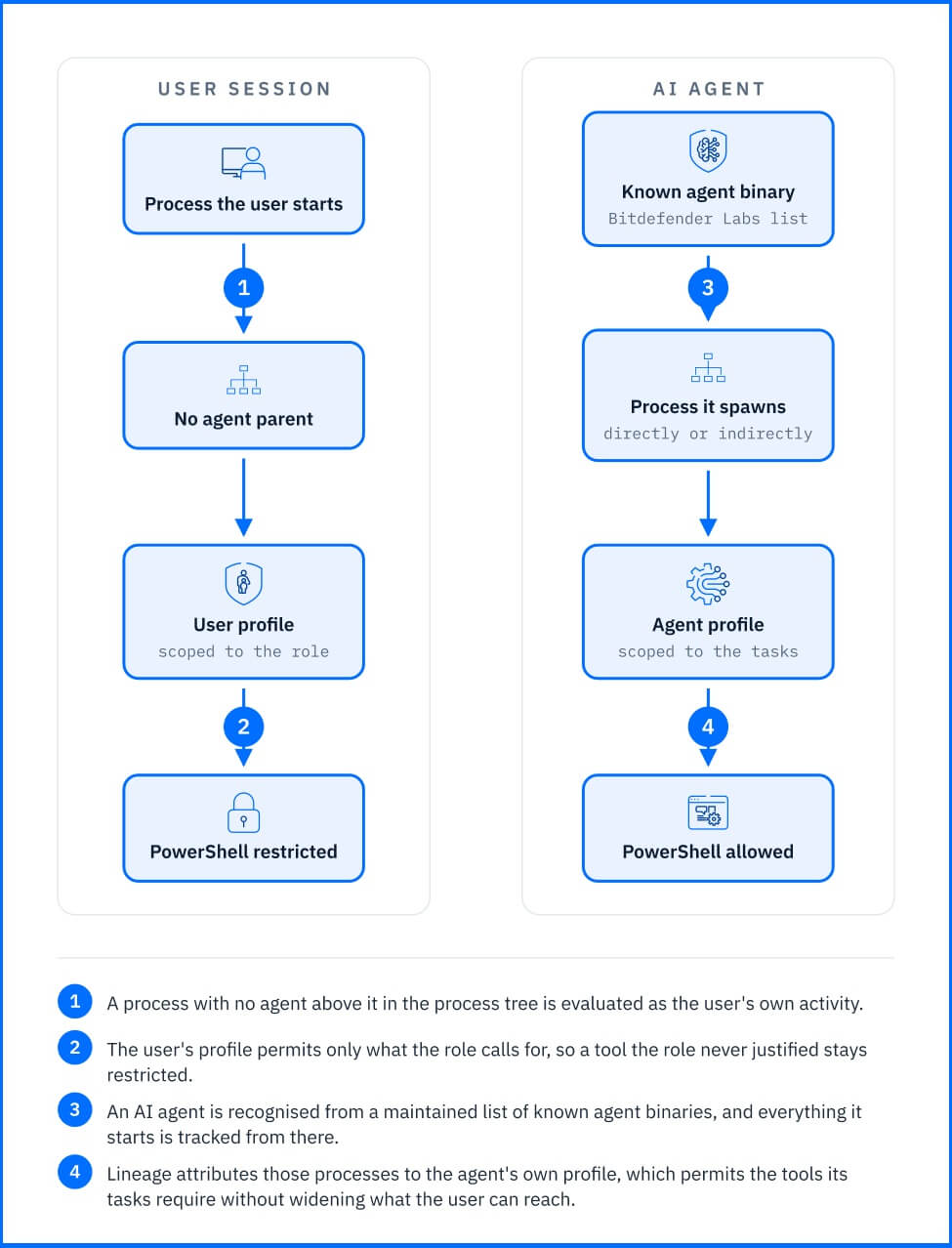 Fig. 8. Process lineage attributes an agent’s activity to the agent’s own profile rather than to the user’s session |
Contractor laptops, personal phones, and other unmanaged machines sit outside that inventory, and browser-reachable assistants are exactly the kind of tool used from them. No endpoint or network control closes that gap: a personal account on a personal device produces no record an organization can query.
The solution is to make the official path attractive enough that using unauthorized solutions is no longer worthwhile; people turn to so-called "shadow AI" to overcome obstacles, and this approach removes those obstilces.